
Can an outsourced team work inside your existing practice management system without disrupting the front desk? That’s the practical question behind dental front office outsourcing. The answer depends less on replacing software than on connecting trained human support to the workflows your practice already uses.
It’s reasonable to be cautious. Patient information, account permissions, and consistent processes need careful attention, and onboarding can feel like one more task for a busy team. Remote support should complement your in-house staff, not create a parallel system that leaves everyone guessing.
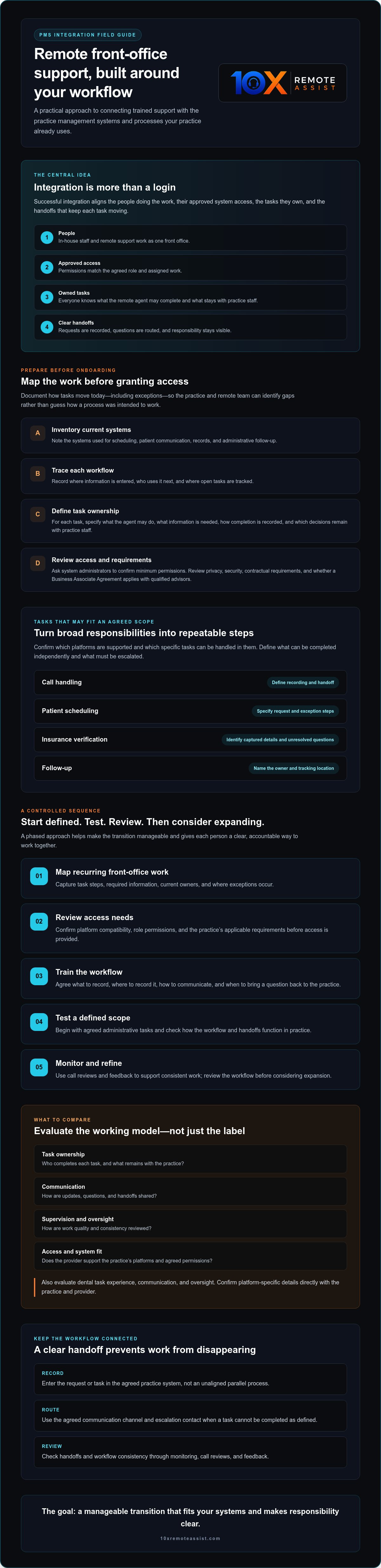
This guide outlines a phased approach to PMS integration, from mapping front-office tasks and reviewing access needs to training, testing, and monitoring workflows. You’ll learn what to evaluate before granting system access, how to define handoffs, and how call reviews and feedback can support consistent work. The goal is a manageable transition that fits your systems and gives everyone a clear, accountable way to work together.
Key Takeaways
- Successful PMS integration aligns people, permissions, tasks, and handoffs within the systems your practice already uses.
- Before onboarding remote support, map recurring front-office work, required information, task owners, and escalation contacts.
- Compare support arrangements by task ownership, communication, supervision, and access needs, not by labels alone.
- Make dental front office outsourcing manageable by starting with defined administrative tasks, then testing and reviewing the workflow before expanding.
- Evaluate provider fit by dental task experience, system compatibility, communication, and oversight. Confirm platform-specific details directly.
Why dental front office outsourcing depends on PMS workflow integration
Dental front office outsourcing works best when remote support fits the practice’s established operations. PMS integration isn’t simply giving someone a login. It means aligning the people doing the work, their approved system access, the tasks they own, and the handoffs that keep each task moving.
That distinction matters. If one person records a patient request in the practice management system while another tracks it elsewhere, the practice may end up with duplicate entries or a missed update. If nobody owns a callback, follow-up can stall. Clear workflows make responsibility visible and help in-house and remote staff operate as one front office.
This is an operational process, not a one-click technical fix. It doesn’t inherently mean replacing the PMS, changing vendors, or automating patient conversations. Outsourcing describes a way to assign work beyond the practice’s internal team; the broader Business Process Outsourcing (BPO) model can include front-office functions. For a dental practice, the focus is connecting assigned administrative work to existing systems and procedures.
What does PMS integration mean for a dental front office?
Remote agents may use practice-approved systems to complete assigned administrative tasks, but access alone isn’t integration. The team also needs workflow training, communication procedures, and clear handoffs: what to record, where to record it, and when to bring a question back to the practice. Confirm which PMS, CRM, or scheduling platform is supported and which specific tasks can be handled in it.
Which front office tasks may fit an integrated workflow?
Depending on the agreed scope, tasks may include call handling, patient scheduling, insurance verification, and follow-up. Before launch, define what the remote agent can complete independently and what must be escalated to an in-house team member. That clarity supports consistent patient communication and can help practices considering dental front office burnout solutions distribute repetitive administrative work more deliberately.
For example, a scheduling workflow should specify how to record appointment requests and what to do when the requested time isn’t available. An insurance verification workflow should define what information to capture and who handles unresolved questions. These details turn broad responsibilities into repeatable steps.
Keep the initial scope manageable. Agree on task ownership, system use, communication channels, and escalation rules before work begins. Then review how the handoffs function in practice. Confirm platform capabilities and access arrangements with both the practice and the provider. Integration is a planned partnership between people and systems, not a software replacement or a promise that every workflow will work identically across platforms.
Prepare your dental practice management system before onboarding remote support
Preparation starts with a clear picture of how work moves through the practice today. Before dental front office outsourcing begins, inventory the systems staff use for scheduling, patient communication, records, and administrative follow-up. Note where information is entered, who uses it next, and where staff currently track open tasks.
Document the current process before changing it. A simple workflow map can show, for example, that appointment requests arrive through one channel but are recorded in another, or that follow-up depends on an employee remembering to check a queue. Capture the steps as they happen, including exceptions. This baseline helps the practice and remote team identify gaps during onboarding rather than guess how the process was intended to work.
Document workflows and define access responsibilities
For each task under consideration, identify what the remote agent may do, what information is needed, how completion is recorded, and which decisions stay with practice staff. Scheduling instructions, for example, can explain how to handle an unavailable requested time and who resolves the exception.
Next, ask system administrators to confirm the minimum permissions required for each role. Don’t assume a shared account or broad access is necessary. Review privacy, security, and contractual requirements with qualified advisors, including whether the relationship requires a Business Associate Agreement. HHS guidance explains the HIPAA business associate framework; the practice should confirm how it applies to its specific arrangement.
Choose integration measures the practice can actually monitor
Keep oversight practical. Choose a small set of measures tied to the agreed workflow, such as whether assigned tasks are completed, what outcomes calls receive, and how many handoffs remain unresolved. Decide who reviews exceptions, updates procedures when needed, and communicates changes to remote agents. Without a named owner, even a well-documented process can drift.
Use the baseline to distinguish a training gap from a workflow gap. If tasks are repeatedly returned for clarification, instructions may need revision. If handoffs stall, ownership or escalation contacts may be unclear. Practices comparing dental remote support options can ask providers how training, system access, and ongoing communication fit current procedures. For additional staff-development context, explore dental front office training alternatives as part of preparation.
Preparation doesn’t require rebuilding every procedure at once. Start with the systems, tasks, and access requirements relevant to the initial scope. Keep the documented workflow available for review as responsibilities evolve.
Compare remote dental front office integration models and workflow handoffs
The right arrangement depends on the practice’s call and task volume, in-house staffing, and how clearly current processes are documented. Some providers may offer dedicated or hybrid remote-team arrangements, but confirm that directly. A model’s label matters less than who owns each task, how the team communicates, and what system access the work requires.
Use this comparison to clarify where work happens and when responsibility transfers:
| Workflow model | Who handles the task | Key handoff to define |
|---|---|---|
| In-house execution | Practice staff manage the task within established systems. | Who takes over when the assigned staff member is unavailable or an exception arises? |
| Outsourced task support | Remote agents handle specifically assigned administrative work in approved systems. | What information must be recorded, and which requests must be flagged or transferred? |
| Shared workflow | Remote and in-house staff complete different steps in one process. | At what point does ownership change, and how does the next person know what’s been completed? |
For instance, a remote agent may handle a scheduling request, while an in-house team member resolves an exception that needs practice-specific context. Document the transfer point so neither team has to infer who acts next.
How should a practice divide work between in-house and remote staff?
Name an owner for patient requests, schedule changes, and follow-ups. Keep decisions requiring clinical judgment or in-person context with appropriate practice staff. Then define escalation triggers, such as a request outside the agent’s assigned scope or a situation that needs staff review. Clear triggers help remote agents flag issues promptly without making decisions beyond their role.
What should the practice compare before selecting a provider?
Ask how agents learn the practice’s procedures and use its approved systems. Confirm how the provider shares performance information, reviews calls, and communicates process updates. If call recording or quality scoring is used, clarify how the review works and what the practice can access. These questions help assess a virtual dental receptionist arrangement as a working relationship, not just a staffing label.
Dental front office outsourcing is more manageable when every request has a clear owner, every handoff has a next step, and staff know how to raise an exception. Compare providers against your actual workflows, including their training approach, communication routines, and system-access requirements. The right-fit model is one the team can supervise and sustain, not necessarily the one with the most complex structure.
Integrate outsourced dental front office support in a controlled sequence
A measured rollout gives the practice and remote team a chance to test the workflow before adding responsibilities. Use this sequence to keep decisions visible and manageable:
- Map workflows. Document the selected tasks, the steps involved, who owns each step, and when an issue needs escalation.
- Confirm access. Work with system administrators to verify which approved systems and permissions are needed. Confirm how access will be provided, tested, reviewed, and removed when it’s no longer required.
- Train agents. Share current procedures, practice terminology, communication expectations, and escalation paths. Use examples that don’t include unnecessary patient information.
- Test tasks. Begin with a defined group of administrative responsibilities and practice-approved scenarios before expanding the scope.
- Review results. Check task records and handoffs with the staff responsible for the workflow. Use regular check-ins to raise questions and update procedures where needed.
Keep the initial scope focused. A small, well-defined set of tasks makes it easier to identify whether an issue comes from unclear instructions, system access, or a handoff that needs clarification. Expand responsibilities after the team has reviewed how the initial workflow operates.
How should the first onboarding phase work?
Name a practice lead and a provider contact. The practice lead can clarify procedures and approve workflow changes, while the provider contact coordinates questions from remote agents. Before work begins, make sure both know how to raise issues and who can authorize a change. This creates a clear path for decisions instead of relying on informal messages or assumptions.
How can a practice test workflows before expanding support?
Use approved scenarios to check scheduling, documentation, handoffs, and exception handling. Have the responsible staff member review each handoff: Was the right information recorded? Is the next owner clear? Did an exception reach the right person? Log issues by category, owner, and resolution so patterns can guide practical updates.
Regular check-ins give the teams a forum to discuss what’s working, clarify procedures, and flag unresolved questions. They don’t guarantee better performance, but they make it easier to review the process consistently. If staffing continuity is also a concern, explore the topic of dental front desk turnover alongside your onboarding plans.
Ready to discuss how trained dental front-office support could fit your practice’s workflows? Explore dental remote support and bring your task scope and system questions to the conversation.
Evaluate dental front office outsourcing and plan the next integration step
A provider should fit the way your practice works, not leave your team guessing about how responsibilities transfer. Evaluate dental front office outsourcing against four practical criteria: experience with dental administrative tasks, fit with your workflows and systems, dependable communication, and clear oversight. Ask for specific answers about your needs rather than assuming a platform or process is supported.
What questions should practices ask before moving forward?
Use the discussion to clarify responsibilities and accountability. Ask:
- How do agents learn our practice’s procedures, terminology, and escalation paths?
- How are workflow updates communicated when our procedures change?
- Which of our systems and specific administrative tasks are supported?
- How are calls recorded and reviewed, and what performance information is shared with the practice?
- Which tasks are in scope, and which decisions or exceptions remain with our staff?
Clear answers should establish operating expectations before work begins. Confirm who provisions and oversees access, how the provider reports questions or unresolved handoffs, and who at the practice approves procedure changes. For recorded calls and quality reviews, ask how the process works and what information is available to your team. Don’t rely on assumptions about platform compatibility, permissions, or reporting.
How can 10X Remote Assist fit into an existing front office?
10X Remote Assist provides trained human agents for dental phone answering, scheduling, insurance verification, and follow-up. Its service is designed to work with existing practice management, CRM, and scheduling systems. Confirm the specific platform and tasks for your practice. Patient-facing calls remain human-led; call recording and AI-driven quality scoring support review, but practices should confirm the applicable recording and review details.
Think of the provider as a potential extension of your front-office team, with defined responsibilities and an agreed way to communicate. Before taking the next step, outline the tasks you’re considering, the systems involved, and the questions that need a provider-specific answer. That gives both sides a practical basis for discussing fit without presuming that every workflow or platform works the same way.
Discuss your dental front office workflow to review your system requirements, task scope, and the kind of remote support that may fit your practice.
Build a smoother front office one workflow at a time
Successful dental front office outsourcing starts with a practical foundation: map how work moves through your practice, define task owners and escalation paths, then confirm system access before onboarding. A phased rollout lets your team test a focused set of administrative tasks and review handoffs before expanding support.
10X Remote Assist provides trained human agents for dental front-office tasks, including phone answering, scheduling, insurance verification, and follow-up. The service is designed to work with existing practice management, CRM, and scheduling systems, though you’ll want to confirm fit for your platforms and workflows. Calls are recorded and evaluated with AI-driven quality scoring to support review, while patient-facing conversations remain human-led.
The right integration should feel like a coordinated extension of your team, with clear communication and oversight, not a separate process to manage. If you’re ready to explore how remote support could fit your current systems, discuss your dental front office workflow. Start with your questions and priorities, then agree on a manageable next step.
Frequently Asked Questions
What does PMS integration mean for dental front office outsourcing?
PMS integration means aligning remote team members, approved system access, assigned tasks, and handoffs with the practice’s existing workflows. It’s more than providing a login. The practice and provider should agree on what agents record, how they mark work complete, and when they escalate an exception. Clear procedures help prevent duplicate entry, missed follow-ups, and confusion about who owns the next step.
Can an outsourced dental front office team use our existing practice management system?
Remote support may be designed to work with a practice’s existing systems, but compatibility depends on the specific platform and tasks. Confirm directly with the provider whether your practice management, CRM, and scheduling tools are supported and how agents would use them. Ask your system administrator to review access requirements, permissions, and restrictions before onboarding. Don’t assume every function is available in every platform.
How do you integrate a remote dental front office team with a PMS?
Integrate the team in stages: map the current workflow, define task owners and escalation points, confirm approved access, train agents on practice procedures, test selected tasks, then review handoffs. For example, test how an appointment request is recorded and what happens if the requested time isn’t available. Use practice-approved scenarios and assign a practice lead to answer questions and coordinate workflow changes.
Is outsourcing dental front office work secure?
Security depends on the access controls, procedures, and agreements used by the practice and provider, so assess these before sharing patient information. Ask how access is provisioned and reviewed, which systems agents need, and how access is removed when no longer required. Have qualified privacy or compliance advisors review applicable requirements and contracts. Confirm call-recording policies and how recorded calls are accessed and evaluated.
What dental front office tasks can be outsourced through a PMS workflow?
Depending on the agreed scope and platform fit, administrative tasks may include phone answering, patient scheduling, insurance verification, and follow-up. The practice should define what information agents record, how they document completion, and which requests need staff review. Clinical decisions and exceptions requiring practice-specific judgment should remain with appropriate practice staff. Confirm supported tasks with the provider rather than assuming every workflow can be handled remotely.
How long does it take to integrate outsourced dental support?
There isn’t a single timeline that applies to every practice. The time required depends on the systems involved, the tasks selected, access approvals, and how clearly procedures are documented. A controlled onboarding sequence can help the practice identify outstanding questions before expanding the scope. Ask the provider for an estimate based on your platform and workflow, and confirm what preparation the practice must complete first.
How can a dental practice keep oversight of outsourced front office work?
Maintain oversight by assigning a practice lead, setting clear task and escalation rules, and reviewing completed work and unresolved handoffs. Agree on how questions, performance information, and procedure updates will be shared. 10X Remote Assist’s calls are recorded and evaluated with AI-driven quality scoring; ask how call reviews and relevant information are made available to your practice. Regular check-ins can surface issues for review without guaranteeing particular results.
To discuss your task scope, systems, and front-office workflow, contact 10X Remote Assist.
Frequently Asked Questions
Remote agents may use practice-approved systems to complete assigned administrative tasks, but access alone isn’t integration. The team also needs workflow training, communication procedures, and clear handoffs: what to record, where to record it, and when to bring a question back to the practice. Confirm which PMS, CRM, or scheduling platform is supported and which specific tasks can be handled in it.
Depending on the agreed scope, tasks may include call handling, patient scheduling, insurance verification, and follow-up. Before launch, define what the remote agent can complete independently and what must be escalated to an in-house team member. That clarity supports consistent patient communication and can help practices considering dental front office burnout solutions distribute repetitive administrative work more deliberately. For example, a scheduling workflow should specify how to record appointment requests and what to do when the requested time isn’t available. An insurance verification workflow should define what information to capture and who handles unresolved questions. These details turn broad responsibilities into repeatable steps. Keep the initial scope manageable. Agree on task ownership, system use, communication channels, and escalation rules before work begins. Then review how the handoffs function in practice. Confirm platform capabilities and access arrangements with both the practice and the provider. Integration is a planned partnership between people and systems, not a software replacement or a promise that every workflow will work identically across platforms. Preparation starts with a clear picture of how work moves through the practice today. Before dental front office outsourcing begins, inventory the systems staff use for scheduling, patient communication, records, and administrative follow-up. Note where information is entered, who uses it next, and where staff currently track open tasks. Document the current process before changing it. A simple workflow map can show, for example, that appointment requests arrive through one channel but are recorded in another, or that follow-up depends on an employee remembering to check a queue. Capture the steps as they happen, including exceptions. This baseline helps the practice and remote team identify gaps during onboarding rather than guess how the process was intended to work.
Name an owner for patient requests, schedule changes, and follow-ups. Keep decisions requiring clinical judgment or in-person context with appropriate practice staff. Then define escalation triggers, such as a request outside the agent’s assigned scope or a situation that needs staff review. Clear triggers help remote agents flag issues promptly without making decisions beyond their role.
Ask how agents learn the practice’s procedures and use its approved systems. Confirm how the provider shares performance information, reviews calls, and communicates process updates. If call recording or quality scoring is used, clarify how the review works and what the practice can access. These questions help assess a virtual dental receptionist arrangement as a working relationship, not just a staffing label. Dental front office outsourcing is more manageable when every request has a clear owner, every handoff has a next step, and staff know how to raise an exception. Compare providers against your actual workflows, including their training approach, communication routines, and system-access requirements. The right-fit model is one the team can supervise and sustain, not necessarily the one with the most complex structure. A measured rollout gives the practice and remote team a chance to test the workflow before adding responsibilities. Use this sequence to keep decisions visible and manageable: Keep the initial scope focused. A small, well-defined set of tasks makes it easier to identify whether an issue comes from unclear instructions, system access, or a handoff that needs clarification. Expand responsibilities after the team has reviewed how the initial workflow operates.
Name a practice lead and a provider contact. The practice lead can clarify procedures and approve workflow changes, while the provider contact coordinates questions from remote agents. Before work begins, make sure both know how to raise issues and who can authorize a change. This creates a clear path for decisions instead of relying on informal messages or assumptions.
Use approved scenarios to check scheduling, documentation, handoffs, and exception handling. Have the responsible staff member review each handoff: Was the right information recorded? Is the next owner clear? Did an exception reach the right person? Log issues by category, owner, and resolution so patterns can guide practical updates. Regular check-ins give the teams a forum to discuss what’s working, clarify procedures, and flag unresolved questions. They don’t guarantee better performance, but they make it easier to review the process consistently. If staffing continuity is also a concern, explore the topic of dental front desk turnover alongside your onboarding plans. Ready to discuss how trained dental front-office support could fit your practice’s workflows? Explore dental remote support and bring your task scope and system questions to the conversation. A provider should fit the way your practice works, not leave your team guessing about how responsibilities transfer. Evaluate dental front office outsourcing against four practical criteria: experience with dental administrative tasks, fit with your workflows and systems, dependable communication, and clear oversight. Ask for specific answers about your needs rather than assuming a platform or process is supported.
Use the discussion to clarify responsibilities and accountability. Ask: Clear answers should establish operating expectations before work begins. Confirm who provisions and oversees access, how the provider reports questions or unresolved handoffs, and who at the practice approves procedure changes. For recorded calls and quality reviews, ask how the process works and what information is available to your team. Don’t rely on assumptions about platform compatibility, permissions, or reporting.
10X Remote Assist provides trained human agents for dental phone answering, scheduling, insurance verification, and follow-up. Its service is designed to work with existing practice management, CRM, and scheduling systems. Confirm the specific platform and tasks for your practice. Patient-facing calls remain human-led; call recording and AI-driven quality scoring support review, but practices should confirm the applicable recording and review details. Think of the provider as a potential extension of your front-office team, with defined responsibilities and an agreed way to communicate. Before taking the next step, outline the tasks you’re considering, the systems involved, and the questions that need a provider-specific answer. That gives both sides a practical basis for discussing fit without presuming that every workflow or platform works the same way. Discuss your dental front office workflow to review your system requirements, task scope, and the kind of remote support that may fit your practice. Successful dental front office outsourcing starts with a practical foundation: map how work moves through your practice, define task owners and escalation paths, then confirm system access before onboarding. A phased rollout lets your team test a focused set of administrative tasks and review handoffs before expanding support. 10X Remote Assist provides trained human agents for dental front-office tasks, including phone answering, scheduling, insurance verification, and follow-up. The service is designed to work with existing practice management, CRM, and scheduling systems, though you’ll want to confirm fit for your platforms and workflows. Calls are recorded and evaluated with AI-driven quality scoring to support review, while patient-facing conversations remain human-led. The right integration should feel like a coordinated extension of your team, with clear communication and oversight, not a separate process to manage. If you’re ready to explore how remote support could fit your current systems, discuss your dental front office workflow. Start with your questions and priorities, then agree on a manageable next step.
PMS integration means aligning remote team members, approved system access, assigned tasks, and handoffs with the practice’s existing workflows. It’s more than providing a login. The practice and provider should agree on what agents record, how they mark work complete, and when they escalate an exception. Clear procedures help prevent duplicate entry, missed follow-ups, and confusion about who owns the next step.
Remote support may be designed to work with a practice’s existing systems, but compatibility depends on the specific platform and tasks. Confirm directly with the provider whether your practice management, CRM, and scheduling tools are supported and how agents would use them. Ask your system administrator to review access requirements, permissions, and restrictions before onboarding. Don’t assume every function is available in every platform.
Integrate the team in stages: map the current workflow, define task owners and escalation points, confirm approved access, train agents on practice procedures, test selected tasks, then review handoffs. For example, test how an appointment request is recorded and what happens if the requested time isn’t available. Use practice-approved scenarios and assign a practice lead to answer questions and coordinate workflow changes.
Security depends on the access controls, procedures, and agreements used by the practice and provider, so assess these before sharing patient information. Ask how access is provisioned and reviewed, which systems agents need, and how access is removed when no longer required. Have qualified privacy or compliance advisors review applicable requirements and contracts. Confirm call-recording policies and how recorded calls are accessed and evaluated.
Depending on the agreed scope and platform fit, administrative tasks may include phone answering, patient scheduling, insurance verification, and follow-up. The practice should define what information agents record, how they document completion, and which requests need staff review. Clinical decisions and exceptions requiring practice-specific judgment should remain with appropriate practice staff. Confirm supported tasks with the provider rather than assuming every workflow can be handled remotely.
There isn’t a single timeline that applies to every practice. The time required depends on the systems involved, the tasks selected, access approvals, and how clearly procedures are documented. A controlled onboarding sequence can help the practice identify outstanding questions before expanding the scope. Ask the provider for an estimate based on your platform and workflow, and confirm what preparation the practice must complete first.
Maintain oversight by assigning a practice lead, setting clear task and escalation rules, and reviewing completed work and unresolved handoffs. Agree on how questions, performance information, and procedure updates will be shared. 10X Remote Assist’s calls are recorded and evaluated with AI-driven quality scoring; ask how call reviews and relevant information are made available to your practice. Regular check-ins can surface issues for review without guaranteeing particular results. To discuss your task scope, systems, and front-office workflow, contact 10X Remote Assist.
Build the remote team that runs this for you
We recruit, train and manage a dedicated remote team member for your practice.