
What if adding remote support could make your front office feel more coordinated, not more complicated? Successful remote dental team integration takes more than assigning calls or scheduling to someone off-site. It starts with clear ownership, workflows that fit your practice, and handoffs your team can rely on.
It’s reasonable to ask who handles insurance questions, how remote staff will use your systems, and whether patients will notice a disconnect. These concerns are easier to manage when remote support works as an extension of the practice team, with defined responsibilities and consistent communication.
This practical guide explains how to prepare, onboard remote support, and build it into daily operations without disrupting patient care. You’ll learn how to map calls, scheduling, insurance verification, and follow-up; establish clear handoffs; and set expectations for handling information. You’ll also see how to track performance and refine workflows over time. Trained human agents can work in your existing practice systems, while recorded calls are evaluated through AI-driven quality scoring, supporting a consistent patient experience with clear accountability.
Key Takeaways
- Set clear operational goals before assigning work, so remote support addresses specific front-office needs.
- Map each task from intake to completion, including who owns it, where it’s recorded, and what happens next.
- Choose a remote dental team integration model that fits your coverage and coordination needs, while weighing trade-offs in oversight and continuity.
- Launch in phases, with a named practice owner, remote counterpart, and completion signal for each step.
- Review agreed measures for calls, scheduling, task completion, and escalations to refine the workflow over time.
Remote Dental Team Integration Starts with Clear Practice Goals
Remote support works best when it fits the practice’s operating rhythm. Remote dental team integration is the alignment of remote people, practice systems, task ownership, and communication routines so work moves consistently from start to finish, rather than being outsourced as a disconnected task. This approach reflects the core idea of virtual teams: people working across locations still need shared goals, clear roles, and reliable ways to coordinate.
Start by identifying where the front office is under pressure. A remote teammate may answer calls, schedule appointments, verify insurance, or complete patient follow-up. Before assigning work, identify the bottleneck behind it. If staff aren’t sure who owns a callback or where to record a verification result, moving that task elsewhere may relocate the confusion instead of fixing it.
Which front-office workflows are ready for remote support?
Look for repeatable administrative work with a clear start, finish, and next step. Separate it from work that needs clinical judgment or an in-office interaction, and define how those requests should be routed to the appropriate practice staff. Then prioritize candidate workflows by volume, delay, patient impact, and current staff capacity.
- Calls: Identify when unanswered calls or recurring call tasks create a backlog. Note what the caller needs, who responds, and where the outcome is recorded.
- Scheduling: Look for appointment requests, confirmations, or follow-up that lack a consistent owner. Define which appointment changes agents can make and which need staff input.
- Insurance verification: Note where delays or unclear handoffs affect the next administrative step. Specify what information must be recorded for the team to act on the result.
- Follow-up: Find patient outreach that’s being postponed or completed inconsistently. Set a clear owner and a way to mark each task complete.
Choose a focused starting point. A clear, recurring workflow is easier to document and assess than several loosely defined tasks launched at once.
Set integration goals before onboarding begins
Capture a baseline before responsibilities shift. Depending on the workflow, this might include unanswered calls, the number of scheduling requests awaiting action, or whether follow-up tasks are completed and recorded. Use information the practice can track consistently; don’t rely on unsupported industry benchmarks.
For each goal, name an owner, choose a review period, and define what progress will look like. For example, the practice might review its call log regularly to see whether fewer calls remain unanswered, or check a follow-up queue to see whether assigned tasks are closed and documented. Set targets based on the practice’s starting point and capacity, not an invented universal standard.
Connect these measures to the wider operating picture. The dental practice workflow optimization checklist can help place remote support goals within broader workflow improvements. Clear objectives give onboarding direction, make accountability visible, and create a practical basis for refining the arrangement.
Connect Remote Dental Staff to Systems, Workflows, and Handoffs
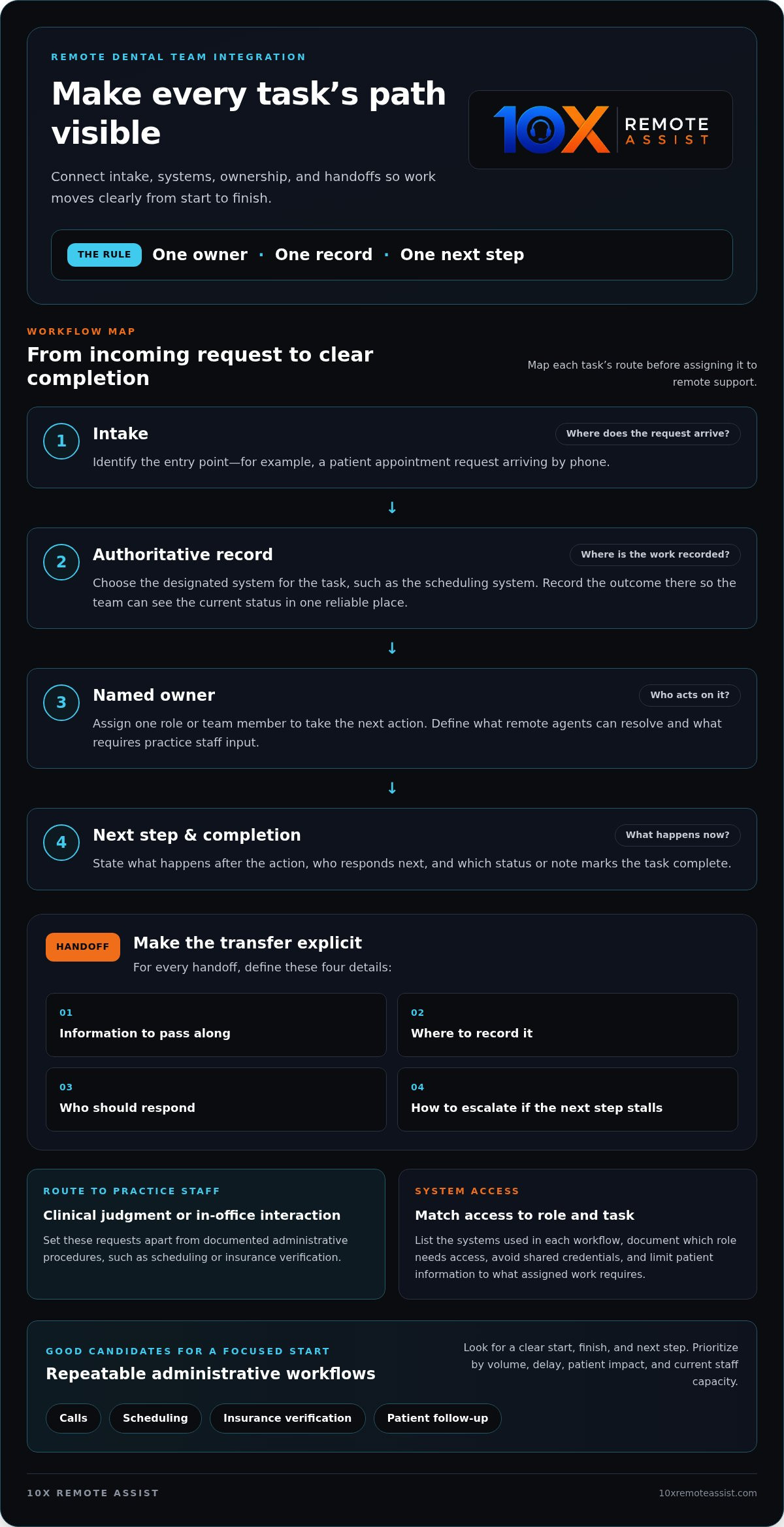
Once responsibilities are defined, make the path for each task visible. Map what happens from intake to completion: where a request arrives, which system holds the authoritative record, who acts on it, and what happens next. Each workflow needs one owner, one record, and one next step. Without those basics, tasks can be duplicated, missed, or left in limbo between the remote team and the office.
A practical workflow map might show that a patient’s appointment request arrives by phone, is recorded in the scheduling system, and goes to a designated team member for booking or escalation. The map should also state what the remote agent records after acting, so in-office staff can see the current status without searching through messages.
Build a system and access map for remote dental teams
List the practice management, CRM, scheduling, and communication systems used in each workflow. Then document which role needs access to each system and for what task. Keep access role-based, avoid shared credentials, and limit patient information to what’s needed to complete assigned work. Document privacy procedures and have qualified guidance verify which HIPAA requirements apply to the practice and its arrangements. The American Medical Association’s guide to implementing remote administrative roles offers useful context for defining remote work and related procedures.
Choose a consistent place to record outcomes, such as a completed verification status or a callback note in the designated system. Specify the status or note that marks the task complete. The aim is one reliable view of the work, not parallel records that drift apart.
Make patient and staff handoffs explicit
Set the boundary between tasks remote agents can resolve and requests they must route to practice staff. Administrative steps such as scheduling or insurance verification can follow documented procedures; clinical questions and situations requiring an in-office interaction should go to the appropriate practice team member.
For every handoff, specify what information to pass along, where to record it, who should respond, and how to escalate if the next step stalls. For example, a scheduling conflict should include the patient’s request, the conflict identified, and the action needed from staff. An urgent call should follow a clearly documented route rather than relying on an agent to guess who is available. These protocols give both teams a shared operating reference. For more detail on call handling and scheduling responsibilities, see the dental call center services guide.
10X Remote Assist provides dental remote support that works within existing practice systems as a coordinated extension of the front office.
Compare Remote Dental Team Integration Models for Your Practice
The right model depends on the work that needs coverage and how closely tasks must coordinate with in-office staff. Software access alone won’t create integration. Roles, handoffs, training, and ongoing performance review determine whether the operating model works in practice.
Use this comparison to weigh continuity, flexibility, oversight, and process complexity. Match repeatable, high-volume work to a structured approach, and assign exceptions to a clear owner.
| Model | Fit | Workflow strengths | Coordination needs | Watch-outs |
|---|---|---|---|---|
| In-house only | Practices whose current team can manage the workload and coverage needs. | Direct day-to-day contact and established familiarity with office routines. | Staff still need clear task ownership, documentation, and backup plans. | Recurring administrative work can compete with other front-office responsibilities. |
| Dedicated remote | Practices with sustained needs across recurring administrative workflows. | Supports continuity and familiarity with defined processes over time. | Requires role clarity, structured training, and regular communication with the practice. | Without oversight and workflow updates, established routines can drift from practice needs. |
| Hybrid | Practices where in-office staff retain selected responsibilities and remote agents extend administrative capacity. | Allows work to be divided around responsibilities, coverage needs, and team strengths. | Requires especially clear handoffs so tasks aren’t duplicated or left between teams. | Overlapping ownership can make accountability harder to see. |
| Task-focused | Practices ready to begin with one bounded workflow. | Creates a focused way to test documentation, training, and handoffs before expanding. | Needs a defined task boundary, an owner, and a review process. | A narrow pilot may not show how multiple workflows will coordinate at scale. |
When does a dedicated or hybrid remote team fit best?
A dedicated model may suit a practice with steady administrative demand that benefits from consistent ownership across calls, scheduling, insurance verification, or follow-up. A hybrid model can fit when the office wants to retain certain tasks while remote agents handle defined portions of daily workflows. Assess practice size alongside task volume, schedule patterns, and the internal capacity to supervise and communicate. The deciding factor isn’t size alone. It’s whether responsibilities and oversight can be sustained.
When should practices begin with task-focused integration?
Start with a bounded workflow, such as insurance verification follow-up or appointment outreach, when the practice wants to uncover training and handoff needs before broadening support. Define what enters the pilot, who handles exceptions, and what the team will review. Patient-booking workflows may benefit from the considerations in this dental patient booking service guide.
Whichever model you select, treat implementation as more than a system connection. Train the people involved, monitor whether handoffs work, and adjust the operating approach as the practice learns. That’s how remote dental team integration becomes part of the team’s routine rather than a separate task queue.
Use This Remote Dental Team Integration Template to Launch in Phases
A phased rollout turns remote dental team integration into a managed process, not a one-time handoff. Start with one defined workflow, confirm that people and systems can support it, then resolve friction before adding responsibilities. For every phase, name a practice owner and a remote-team counterpart, gather the required materials, and agree on a visible completion signal.
Prepare onboarding materials and a workflow playbook
Give remote agents practical instructions they can use while handling work. Include call scripts, scheduling rules, insurance verification steps, escalation criteria, and approved language. Add role-specific system instructions and examples of complete task documentation, so staff can see what a useful note or status update looks like. Set recurring check-ins for questions, exceptions, and practice updates.
- Discovery: Practice owner: office manager. Remote counterpart: team lead. Materials: selected workflow and current process notes. Complete when both owners agree on the scope and known exceptions.
- Workflow design: Practice owner: workflow lead. Remote counterpart: assigned agent or team lead. Materials: task steps, ownership, handoffs, and escalation rules. Complete when the workflow has a documented start, finish, and route for exceptions.
- Access setup: Practice owner: designated system administrator. Remote counterpart: team lead. Materials: role-based access requirements and privacy procedures. Complete when appropriate access is in place and the agent can follow the documented process.
- Training: Practice owner: trainer or workflow lead. Remote counterpart: assigned agent. Materials: scripts, system instructions, and sample records. Complete when the agent can demonstrate the workflow and document its outcome.
- Pilot: Practice owner: office manager. Remote counterpart: team lead. Materials: pilot scope, escalation contacts, and success measures. Complete after the agreed review period, with exceptions and handoff issues logged.
- Review: Practice owner: manager. Remote counterpart: team lead. Materials: pilot results and staff feedback. Complete when owners decide to refine, continue, or expand the workflow.
Use this reusable record for each task: Task | System | Owner | Handoff | Escalation | Measure | Review date. Keep the record current as procedures change. For coordination responsibilities tied to patient treatment plans, refer to the dental treatment coordination service guide.
Run a pilot and refine the operating rhythm
Choose a contained workflow, such as appointment outreach, and define successful completion before it begins. During review, look at exceptions, handoff quality, staff feedback, and the agreed performance indicators. If tasks stall or documentation is unclear, adjust the playbook and retrain before broadening the scope. A steady review rhythm gives the practice and remote team a shared way to improve the process.
Plan your dental remote support rollout with clear workflows, owners, and review points.
Sustain Remote Dental Team Integration with Human Support and Measurable Quality
Integration isn’t finished when system access is set up or onboarding ends. Remote dental team integration needs ongoing management: clear expectations, regular feedback, and a way to turn performance signals into practical improvements. Review agreed indicators for call handling, scheduling outcomes, task completion, and escalation patterns. Look for changes over time, not just isolated results.
At 10X Remote Assist, trained human agents handle patient interactions, while calls are recorded and evaluated using AI-driven quality scoring. This combines real conversations with structured quality insight. The information can help managers spot where a process needs clarification, an agent needs coaching, or a system step is creating friction.
Use performance data to improve workflows, not just score calls
Pair quality trends with call recordings and feedback from remote and in-office staff. A missed follow-up, for example, could point to an unclear ownership rule, incomplete training, or a record that’s hard to update. Don’t treat every issue as an individual performance problem. Identify the cause before choosing a response.
- Process issue: Clarify the workflow, owner, or handoff.
- Training need: Review the relevant procedure and coach against a specific example.
- System friction: Identify where the workflow or documentation process is slowing completion.
Assign an owner and follow-up date to each improvement. At the next review, check whether the change addressed the issue and whether it created new friction elsewhere. That closes the loop between measurement and action.
Make remote support feel like an extension of the practice
Keep practice-specific expectations, patient communication standards, and escalation paths easy to access. When schedules, policies, or responsibilities change, share the update with both remote and in-office staff, then confirm that the workflow instructions reflect it. Consistent updates help patients receive a joined-up experience rather than different answers from different parts of the team.
Dental front-office support from 10X Remote Assist is designed to work with existing practice systems and workflows. Its trained human agents support administrative needs, with recorded calls evaluated through AI-driven quality scoring.
Build a Remote Team That Fits the Way Your Practice Works
Strong remote dental team integration starts with clear goals, not simply adding another person to the task queue. Define who owns each workflow, where work is recorded, and how exceptions move between remote and in-office staff. Then launch in phases, review agreed measures, and refine the process as your team learns.
The right support model should fit your practice’s workflows and daily routines. Trained human agents specialized in dental front-office tasks can work within existing practice management, CRM, and scheduling systems. Recorded calls evaluated using AI-driven quality scoring can also inform ongoing coaching and quality review.
When people, systems, and accountability work together, remote support can become a coordinated extension of your practice team. Build a clear plan for workflows, ownership, and review, then explore remote dental team support built around your practice workflows with 10X Remote Assist.
Frequently Asked Questions
How do you integrate a remote dental team into a practice?
Integrate remote support by aligning people, systems, task ownership, and communication routines before work begins. Start with a specific workflow, such as appointment follow-up, and document where requests arrive, who handles them, where outcomes are recorded, and how exceptions are escalated. Assign practice and remote-team counterparts, provide role-specific training, then review agreed measures and staff feedback before expanding responsibilities.
Can a remote dental team work with our existing practice management software?
Yes. Remote agents can work with a practice’s existing practice management, CRM, and scheduling systems. Build the workflow around the systems your team already uses, and document which system holds the record for each task. Define role-based access and where agents should record outcomes so in-office staff can see current status. Avoid assuming a specific software connection without mapping the practice’s actual workflow.
What tasks can a remote dental team handle?
A remote dental team can handle defined front-office administrative work, including phone answering, patient scheduling, insurance verification, billing and claims support, treatment coordination, and follow-up. Choose tasks with clear steps and ownership, then document what agents can resolve and what they must route to practice staff. Clinical judgment and tasks requiring an in-office interaction should remain with the appropriate practice personnel.
How do you protect patient information when integrating remote staff?
Protect patient information by establishing role-based system access, documenting privacy procedures, and limiting access to information needed for assigned tasks. Avoid shared credentials, and specify where agents may record or communicate workflow updates. Practices should have qualified guidance review applicable HIPAA requirements and their specific arrangements. Build these safeguards into onboarding and ongoing process reviews rather than treating privacy as a one-time setup step.
How long does it take to integrate a remote dental team?
There isn’t one timeline for every practice. The time needed depends on the workflow’s clarity, system access setup, training materials, handoff complexity, and how quickly the team can review a pilot. A defined, repeatable task may be easier to prepare than several workflows with different owners and exceptions. Set phase completion signals and review dates so progress is based on readiness, not an arbitrary deadline.
How can a dental practice measure whether remote team integration is working?
Measure agreed indicators tied to the workflows being supported. A practice might review unanswered calls, scheduling outcomes, completed tasks, follow-up status, or escalation patterns. Compare results with the practice’s own baseline rather than an assumed industry benchmark. Review trends alongside call recordings and feedback from both teams. Assign an owner and follow-up date to each improvement so findings lead to action.
Should a dental practice start with one remote task or several?
Starting with one bounded workflow often makes it easier to identify training gaps, unclear handoffs, and system friction before expanding. Select a repeatable task, define what completion looks like, and name the owner for exceptions. Once the practice and remote team have reviewed the pilot and refined the process, decide whether to continue, adjust, or add another responsibility. A focused start creates a clearer basis for expansion.
Frequently Asked Questions
Look for repeatable administrative work with a clear start, finish, and next step. Separate it from work that needs clinical judgment or an in-office interaction, and define how those requests should be routed to the appropriate practice staff. Then prioritize candidate workflows by volume, delay, patient impact, and current staff capacity. Choose a focused starting point. A clear, recurring workflow is easier to document and assess than several loosely defined tasks launched at once.
A dedicated model may suit a practice with steady administrative demand that benefits from consistent ownership across calls, scheduling, insurance verification, or follow-up. A hybrid model can fit when the office wants to retain certain tasks while remote agents handle defined portions of daily workflows. Assess practice size alongside task volume, schedule patterns, and the internal capacity to supervise and communicate. The deciding factor isn’t size alone. It’s whether responsibilities and oversight can be sustained.
Start with a bounded workflow, such as insurance verification follow-up or appointment outreach, when the practice wants to uncover training and handoff needs before broadening support. Define what enters the pilot, who handles exceptions, and what the team will review. Patient-booking workflows may benefit from the considerations in this dental patient booking service guide. Whichever model you select, treat implementation as more than a system connection. Train the people involved, monitor whether handoffs work, and adjust the operating approach as the practice learns. That’s how remote dental team integration becomes part of the team’s routine rather than a separate task queue. A phased rollout turns remote dental team integration into a managed process, not a one-time handoff. Start with one defined workflow, confirm that people and systems can support it, then resolve friction before adding responsibilities. For every phase, name a practice owner and a remote-team counterpart, gather the required materials, and agree on a visible completion signal.
Integrate remote support by aligning people, systems, task ownership, and communication routines before work begins. Start with a specific workflow, such as appointment follow-up, and document where requests arrive, who handles them, where outcomes are recorded, and how exceptions are escalated. Assign practice and remote-team counterparts, provide role-specific training, then review agreed measures and staff feedback before expanding responsibilities.
Yes. Remote agents can work with a practice’s existing practice management, CRM, and scheduling systems. Build the workflow around the systems your team already uses, and document which system holds the record for each task. Define role-based access and where agents should record outcomes so in-office staff can see current status. Avoid assuming a specific software connection without mapping the practice’s actual workflow.
A remote dental team can handle defined front-office administrative work, including phone answering, patient scheduling, insurance verification, billing and claims support, treatment coordination, and follow-up. Choose tasks with clear steps and ownership, then document what agents can resolve and what they must route to practice staff. Clinical judgment and tasks requiring an in-office interaction should remain with the appropriate practice personnel.
Protect patient information by establishing role-based system access, documenting privacy procedures, and limiting access to information needed for assigned tasks. Avoid shared credentials, and specify where agents may record or communicate workflow updates. Practices should have qualified guidance review applicable HIPAA requirements and their specific arrangements. Build these safeguards into onboarding and ongoing process reviews rather than treating privacy as a one-time setup step.
There isn’t one timeline for every practice. The time needed depends on the workflow’s clarity, system access setup, training materials, handoff complexity, and how quickly the team can review a pilot. A defined, repeatable task may be easier to prepare than several workflows with different owners and exceptions. Set phase completion signals and review dates so progress is based on readiness, not an arbitrary deadline.
Measure agreed indicators tied to the workflows being supported. A practice might review unanswered calls, scheduling outcomes, completed tasks, follow-up status, or escalation patterns. Compare results with the practice’s own baseline rather than an assumed industry benchmark. Review trends alongside call recordings and feedback from both teams. Assign an owner and follow-up date to each improvement so findings lead to action.
Starting with one bounded workflow often makes it easier to identify training gaps, unclear handoffs, and system friction before expanding. Select a repeatable task, define what completion looks like, and name the owner for exceptions. Once the practice and remote team have reviewed the pilot and refined the process, decide whether to continue, adjust, or add another responsibility. A focused start creates a clearer basis for expansion.
Build the remote team that runs this for you
We recruit, train and manage a dedicated remote team member for your practice.