
A full front desk shouldn’t have to choose between helping the patient in front of them and answering the next call. A reliable dental patient booking service can make appointments easier to access while keeping your practice in control of how it communicates with patients.
That balance matters. Calls, schedule changes, and booking requests can pull your team in different directions, while missed follow-up leaves patients unsure what happens next. The answer isn’t simply to add another tool. It’s to create a clear workflow that connects each request to an appropriate appointment, confirmation, and next step.
This guide explains how to build that process from first contact through confirmation. You’ll learn how to compare human support, scheduling software, and combined workflows, then assess how each fits your existing systems and communication preferences. You’ll also see how trained human agents can work as an extension of your team, with call recording and AI-driven quality scoring helping make scheduling activity more visible. The goal is convenient booking for patients, consistent follow-through for your team, and a practice that stays informed and in control.
Key Takeaways
- Define intake rules for appointment types, provider availability, and scheduling constraints before requests begin flowing in.
- Use a dental patient booking service workflow that tracks each inquiry through booking, confirmation, and follow-up.
- Match the booking method to the request: self-scheduling can work well for straightforward appointments, while complex needs may benefit from human support.
- Set clear responsibilities, system access, and escalation paths to integrate booking support without disrupting front-desk operations.
- Review scheduling activity and follow-up consistently so your team can spot gaps and refine the process.
What Does a Dental Patient Booking Service Do?
A dental patient booking service helps a practice manage appointment requests from the first inquiry through scheduling, confirmation, and follow-up. In a multi-doctor office, that means matching each request to the practice’s appointment types, provider availability, and scheduling rules, rather than treating every open slot as interchangeable.
A dental patient booking service is a people-led or technology-supported process for turning patient appointment requests into appropriately scheduled, confirmed visits.
The service can be delivered through staff support, scheduling tools, or a combination. Online scheduling software gives patients a way to book through a digital interface. Human booking support can also handle phone inquiries and requests that require someone to apply the practice’s rules. Call answering is one part of the workflow, not the whole process. General administrative support covers a wider range of tasks; booking support focuses on moving appointment requests forward consistently.
Which tasks can a dental booking service handle?
A booking workflow can answer patient inquiries, gather the information needed to schedule, and match requests to appropriate appointment types and providers. For example, a caller seeking a routine visit may need a different appointment slot from someone requesting a longer visit. The practice defines those distinctions and its availability rules. Booking agents follow them and route unclear or exceptional requests to the appropriate team member.
The workflow continues after a time is selected. It can include recording the appointment in the practice’s scheduling system, confirming the details, and following up when information or a response is still needed. This continuity helps prevent a request from being marked complete before the patient knows what happens next.
Where does booking fit in the dental front office?
Booking connects naturally with phone answering, insurance verification, and patient follow-up. A trained agent can capture an inquiry, schedule within the practice’s rules, and direct an insurance-related question into the appropriate verification workflow. When agents work within existing practice-management, CRM, and scheduling systems, the team can maintain continuity without relying on disconnected notes or unclear handoffs.
The boundary matters: booking support coordinates access and administrative steps, but clinical decisions remain with qualified practice personnel. Agents can escalate questions that call for clinical judgment instead of attempting to answer them. For a busy front desk, a clear division of responsibilities can make patient access more responsive while allowing in-office staff to focus on patients and tasks that need their attention.
Dental Booking Workflow: From Inquiry to Appointment
A dependable booking process gives every request a clear path, whether it comes by phone or through an online form. In a multi-doctor practice, the details matter: appointment types, provider schedules, and handoffs need to be consistent so requests aren’t booked twice, left incomplete, or placed in the wrong slot.
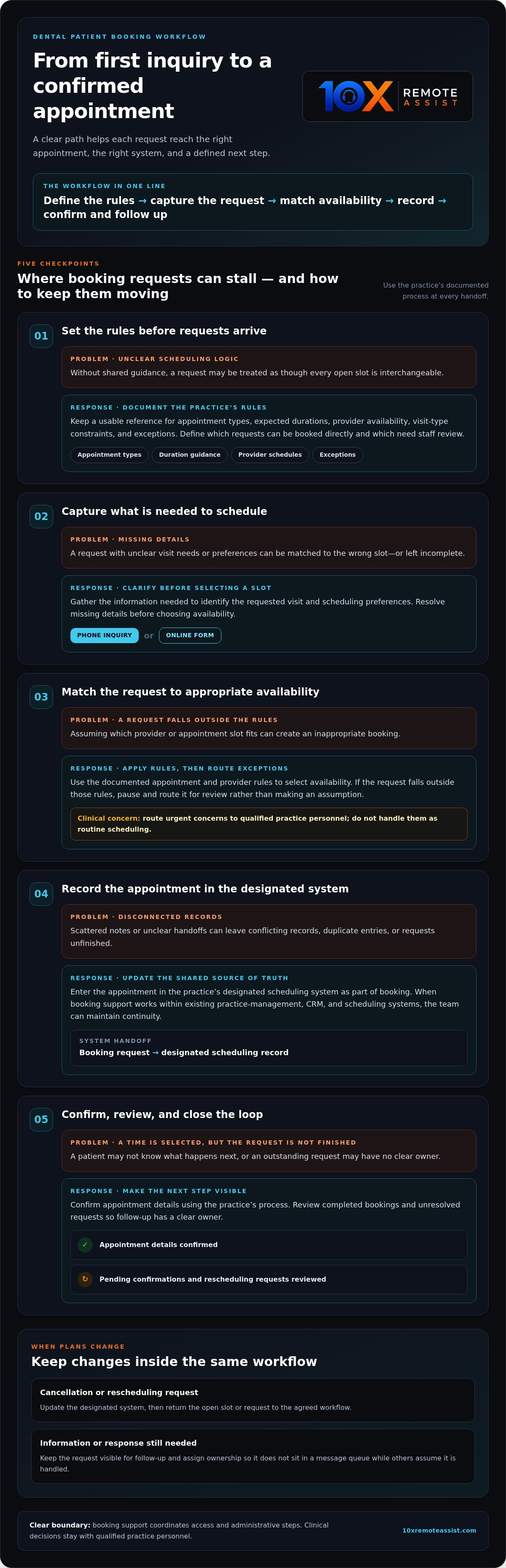
A reliable booking workflow defines the rules, captures the request, matches it to appropriate availability, records the appointment, confirms the details, and closes the loop on changes.
Set booking rules before handling appointment requests
Before a dental patient booking service or front-office team handles requests, document the practice’s scheduling logic. Keep a shared reference for appointment types, expected durations, provider availability, and constraints such as which providers handle specific visit types. Define which requests can be booked directly and which need staff review. Agree on how urgent clinical concerns are routed to qualified practice personnel rather than handled as routine scheduling.
- Define the rules. Record appointment categories, provider schedules, duration guidance, and exceptions in a format that the people handling bookings can use.
- Capture the request. Gather the information needed to identify the requested visit and any scheduling preferences. Clarify missing details before selecting a slot.
- Match the request to availability. Apply the practice’s documented rules. If a request falls outside them, pause and route it for review instead of making an assumption.
- Update the designated system. Enter the appointment in the practice’s scheduling system as part of the booking process. A shared source of truth helps reduce duplicate entries and conflicting records.
- Confirm and review. Confirm the appointment using the practice’s process, then review completed bookings and unresolved requests so follow-up has a clear owner.
Coordinate confirmations, changes, and follow-up
Booking isn’t complete when a time is selected. The appointment details need to be recorded, the patient needs a clear confirmation, and the team needs to know what remains outstanding. When a patient cancels or asks to reschedule, update the designated system and return the open slot or request to the agreed workflow. Assigning ownership prevents a cancellation from sitting in a message queue while another team member assumes it has been handled.
Follow-up supports continuity beyond the calendar. A simple log of pending confirmations, rescheduling requests, and completed outreach helps the team see what needs attention and can reinforce broader dental patient retention strategies. If trained booking support is part of your workflow, clear rules and system updates help it operate as an extension of the practice team. Learn more about dental patient scheduling support.
How to Compare Human Booking Support, Online Scheduling, and Hybrid Models
The right booking model depends on the kinds of requests your practice receives and how much decision-making each requires. Self-scheduling can suit straightforward appointments when patients can choose from clear, current availability. Human support can help when a patient has questions, a request falls outside the usual rules, or a handoff needs attention. A hybrid model combines both paths.
| Factor | Online scheduling | Human booking support | Hybrid model |
|---|---|---|---|
| Patient access | Patients select from available options through a digital interface. | Patients speak with someone who can guide the request. | Patients can self-schedule or use a human-led booking path. |
| Complex requests | Best suited to appointments with rules that can be clearly represented online. | Can clarify questions and follow practice-defined rules for exceptions. | Routes routine requests to self-scheduling and exceptions to a person. |
| Staffing | Reduces the need for staff to enter each straightforward request manually. | Requires trained agents to handle inquiries and booking steps. | Pairs digital access with human help for requests that need it. |
| Visibility | Depends on how booking activity is recorded and shared with the practice. | Can use the practice’s agreed systems and documentation process. | Needs consistent records across both booking paths. |
| Workflow fit | Fits appointment types with clear rules and current availability. | Fits phone-first patients and requests requiring clarification. | Fits practices that want convenient self-service without losing human support. |
When can online scheduling software work well?
Online scheduling is useful when appointment types, provider availability, and booking rules are simple enough for patients to make a suitable selection themselves. Its reliability depends on keeping displayed availability aligned with the practice’s scheduling system. If the calendar or appointment rules are out of date, self-scheduling can create extra correction work. Consider whether your patients prefer to book independently or want help, and whether the appointment types can be presented clearly online.
When can human or hybrid booking support add value?
Human support can assist phone-first patients, answer booking questions, and follow practice-defined instructions when a request doesn’t fit the standard options. In a hybrid workflow, straightforward visits may go through self-scheduling, while exceptions move to a trained agent or designated practice team member. Agreed responsibilities, system updates, and escalation paths help external support work as an extension of the front office, not a separate channel. For broader phone-support context, explore the article on dental call center services.
A dental patient booking service should fit the practice’s operating rules, not force the team to work around a tool or handoff. Compare the models by asking which requests each can handle, where booking activity is recorded, and who owns the next step when a request needs review.
How to Implement a Booking Service Without Disrupting the Front Desk
A new booking process should fit the practice’s operating rhythm, not create another channel for staff to monitor. Before a dental patient booking service goes live, map the systems it touches, the rules it follows, and the people responsible for decisions. Clear ownership lets front-desk staff focus on patients in the office while booking requests continue through a consistent process.
Prepare systems, rules, and team responsibilities
Start with a practical checklist. Keep it accessible to the front desk and any trained booking agents who support the workflow:
- Map the systems. Identify which practice-management, scheduling, CRM, and communication tools hold booking details, patient requests, and follow-up notes. Specify where the final appointment record belongs.
- Document booking rules. Record appointment categories, provider availability, scheduling constraints, and which requests can be handled directly. Use the same reference across the practice and support team.
- Assign ownership. Name who handles cancellations, rescheduling, exceptions, and requests that need review. Make the handoff explicit, including what information to pass along and how the receiving person knows action is needed.
- Set escalation paths. Route clinical questions and concerns to qualified practice personnel. Booking support should not make clinical decisions or leave uncertain requests without a clear next step.
- Define access and handling expectations. Agree which systems each person uses, what information they need for their role, and how booking details are recorded and shared according to practice procedures.
- Brief the team before launch. Explain the workflow, responsibilities, and escalation process to front-desk staff. Make sure everyone knows where to check booking status and how to flag a mismatch.
Review performance and refine the process
Use a regular review to find where the workflow needs adjustment. Track practical measures such as completed bookings, booking accuracy, unresolved requests, and how long it takes for an exception to reach its owner. Review patterns, not just totals. For instance, repeated corrections for one appointment type may point to unclear scheduling rules or a system handoff that needs attention.
Call reviews and front-desk feedback can reveal friction that a booking log alone may miss. Recorded calls evaluated with AI-driven quality scoring can support visibility and coaching, while staff observations help show whether the documented process works in daily practice. Refine rules and handoffs as needs change; outcomes depend on the practice’s workflow and execution. These same principles can inform broader dental practice workflow optimization.
Build a booking workflow that works as an extension of your team. Explore dental patient scheduling support.
How 10X Remote Assist Supports Dental Patient Booking
For a multi-doctor practice, booking support needs to do more than answer calls. It needs to follow the practice’s scheduling rules, keep appointment information moving through the right systems, and give the front desk a clear view of what has been handled. 10X Remote Assist provides trained human agents for dental front-office work, including patient scheduling, phone answering, insurance verification, and follow-up.
What human-led booking support looks like in practice
Agents work as an extension of the practice team, following its booking processes and communication expectations. The practice retains ownership of its scheduling policies, exceptions, and clinical decisions. If a patient raises a clinical concern, the agent routes it to qualified practice personnel rather than making a clinical judgment.
Technology supports that human workflow; it doesn’t replace the agents. Support integrates with existing practice-management, CRM, and scheduling systems to help maintain continuity as requests are handled. Phone answering, appointment scheduling, insurance verification, and follow-up can work together, so a booking request doesn’t become an isolated task. Clear handoffs help the support team and practice staff understand who is responsible for each next step.
Visibility matters, too. Calls are recorded and evaluated with AI-driven quality scoring, providing a basis for reviewing interactions and coaching agents. This helps the practice understand how booking conversations are being handled without treating automation as a substitute for human communication.
How to explore support that fits your workflow
A useful workflow discussion starts with the practice’s operating details: how many doctors and appointment types need to be coordinated, which scheduling rules shape availability, what systems the team uses, and where requests most often require follow-up or escalation. Clarifying which tasks need support, who owns exceptions, and how the front desk should receive updates helps define a model that fits the practice rather than forcing the team into a generic process.
Staffing decisions also involve more than the schedule. Practices weighing dedicated or hybrid remote support can consider how booking responsibilities fit alongside current front-office roles and compare that with broader staffing context in an article about the cost of dental front desk staff. The aim is a well-defined extension of the team, with agreed responsibilities and visibility into scheduling activity.
Explore dental patient booking support to see how trained human agents can support your scheduling workflow alongside phone answering, insurance verification, and follow-up.
Build a Booking Workflow Your Team Can Rely On
A reliable dental patient booking service starts with clear rules: define appointment types and availability, decide which requests need staff review, and make every handoff visible. Then choose the right balance of self-scheduling and human support for your patients and practice. Convenience works best when it fits the way your team actually schedules and communicates.
10X Remote Assist provides trained human agents who support dental front-office tasks as an extension of the practice team. Support integrates with existing practice-management, CRM, and scheduling systems, while recorded calls with AI-driven quality scoring help provide visibility for review and coaching. Your practice retains ownership of its scheduling policies and clinical decisions.
Ready to put a more consistent booking process in place? Explore dental patient booking support and consider how trained human support could fit your workflow. With clear responsibilities and the right support model, your team can make booking easier to manage and help patients move confidently to their next appointment.
Frequently Asked Questions
What is a dental patient booking service?
A dental patient booking service helps a practice manage appointment requests from initial inquiry through scheduling and follow-up. It may use online scheduling, trained human agents, or a hybrid workflow. In a multi-doctor practice, the process should follow defined appointment types, provider availability, and scheduling rules. Human agents can also answer phone inquiries and route requests that need review to the right practice team member.
How does a dental patient booking service work?
A dental patient booking service captures a patient’s request, gathers the information needed to schedule, and matches it to practice-defined availability. The appointment is entered into the designated scheduling system, then confirmed using the practice’s communication process. If a request falls outside the established rules, it should be routed to the assigned staff member instead of being handled by assumption. Changes and follow-up need clear owners, too.
Can a booking service integrate with dental practice-management software?
Yes. Booking support integrates with existing practice-management, CRM, and scheduling systems, helping keep appointment details and follow-up connected to the practice’s workflow. The practice should define which system holds the final appointment record and how changes are documented. 10X Remote Assist works with existing systems as part of its front-office support. Integration helps maintain continuity, while clear responsibilities still guide how requests and exceptions are handled.
Is human booking support better than online scheduling software?
Neither is best for every request. Online scheduling can work well for straightforward appointments when patients can choose from clear, current availability. Human support can help phone-first patients with booking questions and requests that need clarification or follow practice-specific rules. A hybrid model combines self-scheduling for suitable visits with human assistance for exceptions. The right fit depends on appointment complexity, patient preferences, and how the practice manages handoffs.
How much does a dental patient booking service cost?
The cost depends on the type and scope of support, so there isn’t one price that applies to every practice. Managed support uses recurring subscription fees, while specific administrative tasks can be billed per task, such as insurance breakdowns or claim-status follow-ups. Consider which booking, phone answering, insurance verification, or follow-up responsibilities need coverage, then define the workflow and scope when comparing pricing structures.
How can a dental practice reduce booking errors and missed appointments?
Document appointment types, provider availability, duration guidance, and exceptions in one shared reference. Require booking details to be entered into the designated scheduling system, and assign an owner for confirmations, cancellations, and rescheduling requests. Review completed bookings and unresolved requests to spot recurring gaps. Clear follow-up steps help patients know what to expect, while consistent records help the team catch conflicting or incomplete appointment information.
Can an external booking team handle patient calls without disrupting the practice?
Yes. An external team can support patient calls when responsibilities, system access, and handoffs are defined before work begins. Trained human agents can work as an extension of the practice team, following its scheduling process and routing exceptions to the right staff member. Integration with existing systems supports continuity, and recorded calls with AI-driven quality scoring provide visibility for review and coaching. Clinical decisions remain with qualified practice personnel.
Frequently Asked Questions
A booking workflow can answer patient inquiries, gather the information needed to schedule, and match requests to appropriate appointment types and providers. For example, a caller seeking a routine visit may need a different appointment slot from someone requesting a longer visit. The practice defines those distinctions and its availability rules. Booking agents follow them and route unclear or exceptional requests to the appropriate team member. The workflow continues after a time is selected. It can include recording the appointment in the practice’s scheduling system, confirming the details, and following up when information or a response is still needed. This continuity helps prevent a request from being marked complete before the patient knows what happens next.
Booking connects naturally with phone answering, insurance verification, and patient follow-up. A trained agent can capture an inquiry, schedule within the practice’s rules, and direct an insurance-related question into the appropriate verification workflow. When agents work within existing practice-management, CRM, and scheduling systems, the team can maintain continuity without relying on disconnected notes or unclear handoffs. The boundary matters: booking support coordinates access and administrative steps, but clinical decisions remain with qualified practice personnel. Agents can escalate questions that call for clinical judgment instead of attempting to answer them. For a busy front desk, a clear division of responsibilities can make patient access more responsive while allowing in-office staff to focus on patients and tasks that need their attention. A dependable booking process gives every request a clear path, whether it comes by phone or through an online form. In a multi-doctor practice, the details matter: appointment types, provider schedules, and handoffs need to be consistent so requests aren’t booked twice, left incomplete, or placed in the wrong slot. A reliable booking workflow defines the rules, captures the request, matches it to appropriate availability, records the appointment, confirms the details, and closes the loop on changes.
Online scheduling is useful when appointment types, provider availability, and booking rules are simple enough for patients to make a suitable selection themselves. Its reliability depends on keeping displayed availability aligned with the practice’s scheduling system. If the calendar or appointment rules are out of date, self-scheduling can create extra correction work. Consider whether your patients prefer to book independently or want help, and whether the appointment types can be presented clearly online.
Human support can assist phone-first patients, answer booking questions, and follow practice-defined instructions when a request doesn’t fit the standard options. In a hybrid workflow, straightforward visits may go through self-scheduling, while exceptions move to a trained agent or designated practice team member. Agreed responsibilities, system updates, and escalation paths help external support work as an extension of the front office, not a separate channel. For broader phone-support context, explore the article on dental call center services. A dental patient booking service should fit the practice’s operating rules, not force the team to work around a tool or handoff. Compare the models by asking which requests each can handle, where booking activity is recorded, and who owns the next step when a request needs review. A new booking process should fit the practice’s operating rhythm, not create another channel for staff to monitor. Before a dental patient booking service goes live, map the systems it touches, the rules it follows, and the people responsible for decisions. Clear ownership lets front-desk staff focus on patients in the office while booking requests continue through a consistent process.
A dental patient booking service helps a practice manage appointment requests from initial inquiry through scheduling and follow-up. It may use online scheduling, trained human agents, or a hybrid workflow. In a multi-doctor practice, the process should follow defined appointment types, provider availability, and scheduling rules. Human agents can also answer phone inquiries and route requests that need review to the right practice team member.
A dental patient booking service captures a patient’s request, gathers the information needed to schedule, and matches it to practice-defined availability. The appointment is entered into the designated scheduling system, then confirmed using the practice’s communication process. If a request falls outside the established rules, it should be routed to the assigned staff member instead of being handled by assumption. Changes and follow-up need clear owners, too.
Yes. Booking support integrates with existing practice-management, CRM, and scheduling systems, helping keep appointment details and follow-up connected to the practice’s workflow. The practice should define which system holds the final appointment record and how changes are documented. 10X Remote Assist works with existing systems as part of its front-office support. Integration helps maintain continuity, while clear responsibilities still guide how requests and exceptions are handled.
Neither is best for every request. Online scheduling can work well for straightforward appointments when patients can choose from clear, current availability. Human support can help phone-first patients with booking questions and requests that need clarification or follow practice-specific rules. A hybrid model combines self-scheduling for suitable visits with human assistance for exceptions. The right fit depends on appointment complexity, patient preferences, and how the practice manages handoffs.
The cost depends on the type and scope of support, so there isn’t one price that applies to every practice. Managed support uses recurring subscription fees, while specific administrative tasks can be billed per task, such as insurance breakdowns or claim-status follow-ups. Consider which booking, phone answering, insurance verification, or follow-up responsibilities need coverage, then define the workflow and scope when comparing pricing structures.
Document appointment types, provider availability, duration guidance, and exceptions in one shared reference. Require booking details to be entered into the designated scheduling system, and assign an owner for confirmations, cancellations, and rescheduling requests. Review completed bookings and unresolved requests to spot recurring gaps. Clear follow-up steps help patients know what to expect, while consistent records help the team catch conflicting or incomplete appointment information.
Yes. An external team can support patient calls when responsibilities, system access, and handoffs are defined before work begins. Trained human agents can work as an extension of the practice team, following its scheduling process and routing exceptions to the right staff member. Integration with existing systems supports continuity, and recorded calls with AI-driven quality scoring provide visibility for review and coaching. Clinical decisions remain with qualified practice personnel.
Build the remote team that runs this for you
We recruit, train and manage a dedicated remote team member for your practice.