
A front desk salary is only the starting point. The cost of dental front desk staff also includes employer taxes, benefits, recruiting, training, and coverage when someone is absent or leaves. When a role is vacant, calls, scheduling, and patient follow-up can also put added pressure on the rest of the team.
If you’re looking at payroll and wondering whether it reflects the real cost of dependable coverage, start by looking beyond wages. Your estimate depends on compensation, benefits, turnover, workload, and how much time other employees spend covering gaps.
This guide shows you how to build a practice-specific estimate, identify costs and capacity gaps that salary alone misses, and compare in-house hiring with remote human administrative support. You’ll assess each model by the work it covers, its fit with your systems, and the oversight it supports. The goal is a staffing decision based on your front desk’s actual demands, not a blanket savings claim.
Key Takeaways
- The cost of dental front desk staff includes more than wages. Separate recurring employment expenses from one-time recruiting and onboarding costs.
- Map compensation, employer expenses, hiring, training, and coverage needs to understand how staffing costs build over time.
- Compare in-house and remote support by workload, coverage, management effort, system integration, and billing structure, not headline price alone.
- Use your practice’s own figures to estimate total annual staffing costs, then divide by productive coverage hours for a more useful comparison.
- Review call handling, scheduling, follow-up, and on-site duties before adjusting your staffing model.
What Does Dental Front Desk Staff Cost Beyond the Hourly Wage?
The hourly rate is a starting point, not the full staffing budget. The hourly wage is what an employee earns for each hour worked; total employment cost is what the practice spends to hire, equip, support, and maintain that role. To estimate the cost of dental front desk staff, include both ongoing expenses and costs that arise during hiring or turnover.
Separate the calculation into two groups. Recurring expenses include wages, applicable overtime, employer payroll taxes, employer-paid benefits, and tools or equipment needed for the job. One-time or periodic costs can include recruiting, background-screening processes, onboarding, and training. If an absence or vacancy requires another employee to cover the desk, record that coverage too. It may create overtime or shift time away from other responsibilities.
What Is Included in the Fully Loaded Cost of a Dental Receptionist?
Start with the compensation package, then add the practice’s share of employment expenses. Benefits vary by employer and may include health coverage or other benefits the practice chooses to provide. Hiring also takes staff time: writing and posting a role, reviewing applicants, interviewing, and preparing a new employee to use practice systems and follow office workflows.
Equipment may be part of the setup when the role needs a dedicated workstation, phone, or other tools. Treat these as practice-specific inputs rather than assuming every office has the same expenses. Tax and employment details can depend on current rules and the employee’s circumstances. Verify applicable obligations using current federal guidance, including IRS employer resources, instead of relying on a generic estimate.
Why Does the Cost Vary Between Dental Practices?
Hours and coverage expectations shape the budget. One employee covering a defined schedule is different from a team rotating across shifts or providing backup during breaks, absences, and busy periods. Responsibilities matter too: a role focused on greeting patients has a different workload from one that also handles calls, scheduling, billing tasks, or follow-up.
Experience, wage conditions, benefit choices, and training needs also vary. So does demand. A larger practice or one with heavier call volume may need more administrative capacity, even if its payroll structure looks similar on paper. Some duties overlap across roles: an overview of the duties of dental assistants notes that receptionist and clerical tasks can be part of the work. Define who owns each task before calculating staffing needs, so shared responsibilities aren’t counted twice or left uncovered.
Build your estimate around the actual role, schedule, and workload. That gives you a useful baseline for comparing staffing approaches.
Which Direct and Hidden Costs Shape Dental Front Desk Staffing?
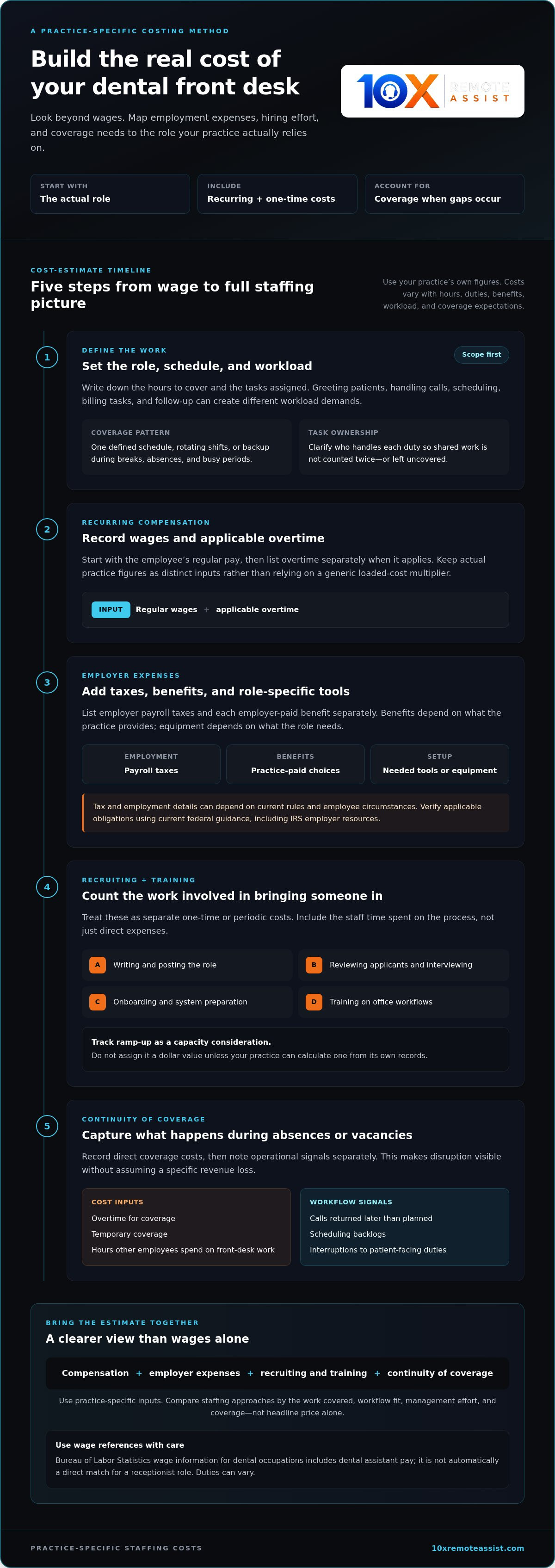
A useful cost model separates four categories: compensation, employer expenses, recruiting and training, and continuity of coverage. This makes it easier to see which expenses appear in payroll records and which arise when workflows are interrupted or work shifts to other team members.
- Compensation: Regular wages and applicable overtime.
- Employer expenses: Payroll taxes and benefits selected by the practice.
- Recruiting and training: Time spent sourcing, interviewing, onboarding, and preparing a new hire for the role.
- Continuity of coverage: Temporary coverage, overtime, or other work delayed when someone is absent or a position is vacant.
Which Payroll and Benefit Expenses Should Owners Count?
Keep wages, overtime, employer payroll taxes, and each employer-paid benefit as separate inputs. That detail matters because pay, employee hours, benefit choices, and tax circumstances differ. Avoid applying one national “loaded cost” multiplier to every practice. Instead, verify current tax treatment through federal guidance, such as IRS employer resources, and use your actual benefit costs.
The Bureau of Labor Statistics publishes wage information for dental occupations, including the median pay for dental assistants. Use occupational data carefully: a dental assistant wage is not automatically a direct match for a receptionist role, and job duties can vary. For context on how responsibilities may overlap, revisit the dental practice workflow optimization checklist and clarify who handles each task in your office.
How Do Hiring, Turnover, and Coverage Gaps Add to Cost?
Turnover can restart several steps: recruiting, interviews, onboarding, and training. Track these as distinct costs, including the staff time spent on each step. Also account for the new employee’s productivity ramp-up as a capacity consideration. Don’t assign it a dollar value unless you can calculate one from your practice’s own records.
Coverage gaps have measurable and operational effects. Record overtime, temporary coverage, or hours other employees spend taking on front desk work. Separately, note indicators such as calls returned later than planned, scheduling backlogs, or interruptions to patient-facing duties. These signals help identify pressure points, but they aren’t proof of a specific revenue loss.
For practices assessing how administrative work could be allocated, human dental front-office support is one model to compare with in-house coverage. Evaluate it against the tasks, workflows, and handoffs your team needs rather than assuming a particular cost or result.
How Does In-House Staffing Compare With Remote Dental Front Desk Support?
There’s no useful comparison based on headline price alone. The right model depends on which tasks need to be handled, where they happen, how much oversight they require, and how reliably they fit into the practice’s systems. For a wider view of administrative support and practice finances, the American Dental Association’s Health Policy Institute offers research on dental practice costs.
When Can an In-House Dental Front Desk Team Make Sense?
In-house coverage is essential for work that requires someone physically at the practice, such as welcoming patients, coordinating the lobby, or supporting on-site handoffs. A practice may also value direct day-to-day supervision and continuity with the rest of the office team. These benefits come with the responsibilities of employing and managing the staff who provide that coverage.
Compare duties, not job titles. A “front desk” position might include patient check-in, phone answering, scheduling, or administrative follow-up, while other tasks may be shared across employees. Clarifying ownership helps prevent duplicated work and shows which responsibilities genuinely require someone on site.
What Should Practices Compare in a Remote Human Support Model?
Remote human support can complement the in-office team by handling defined administrative workflows, including phone answering, scheduling, insurance verification, and follow-up. It is not in-person reception or clinical staffing. Assess the tasks covered, the service hours that match your needs, how work is handed off, and whether support integrates with your practice management, CRM, or scheduling systems.
Billing structure also affects how the expense appears in a budget. 10X Remote Assist offers monthly managed subscriptions or per-task administrative fees. A monthly subscription has a recurring-fee structure; per-task billing ties fees to administrative work performed. Compare either approach with your practice’s actual workload and internal management effort rather than assuming one structure will cost less.
Consider oversight and accountability as well. 10X Remote Assist uses human agents trained for dental front-office work. Calls are recorded and evaluated with AI-driven quality scoring, while the agents remain human. This is a different oversight model from directly supervising an employee in the office. Before comparing scenarios, define who owns exceptions, follow-up, and communication between remote support and the in-house team.
To see how call handling fits into these workflows, read this guide to dental call center services. A clear task map makes it easier to compare the full cost of dental front desk staff and remote support by scope, coverage, integration, and management effort.
How Can You Calculate Your Practice’s True Front Desk Staffing Cost?
A consistent worksheet turns the cost of dental front desk staff into a practice-specific comparison rather than a guess based on salary alone. Use the same time period and task scope for each staffing model. Then calculate the cost of the coverage your team actually receives.
What Inputs Belong in a Dental Front Desk Cost Worksheet?
Work through these steps:
- Define the role. List responsibilities such as greeting patients, answering calls, scheduling, and administrative follow-up. Record which duties require an on-site presence.
- Collect annual costs. Add wages, applicable overtime, employer taxes, selected benefits, recruiting, onboarding, training, and relevant equipment or coverage expenses. Use your own records and verify wage benchmarks by role. The Bureau of Labor Statistics’ dental assistant data can provide context, but assistant pay may not match a receptionist role.
- Measure coverage and workload. Record scheduled hours, productive coverage hours, task mix, absences, call volume, and the number of providers or locations supported. Note time spent on shared duties so it isn’t counted twice.
- Compare scenarios. Build a separate estimate for each approach, using equivalent tasks, coverage periods, and cost categories.
Keep one-time hiring costs distinct from recurring expenses, but include both in the annual view if they occur during the period you’re assessing. If a cost supports multiple roles, allocate only the appropriate share to the front desk calculation.
How Do You Compare Cost Per Coverage Hour Fairly?
Use this formula:
Total annual costs ÷ productive front desk coverage hours = cost per productive coverage hour
Include only the costs assigned to the role in the numerator, then divide by the hours spent delivering the defined front desk coverage. Don’t compare all paid employee hours with only the hours a remote model handles specific tasks. Match the scope first: calls, scheduling, follow-up, and the service windows being covered. Run separate scenarios for different call volumes or staffing needs to see how the comparison changes.
Total cost per productive coverage hour makes staffing models easier to compare because it connects practice-specific spending to the administrative coverage delivered. It’s a decision aid, not a complete measure of service quality or workload fit. Use it alongside task completion, handoffs, and workflow ownership.
To assess remote human support against your worksheet, explore dental front-office support by the administrative tasks your practice needs covered.
What Are the Next Steps for Managing Dental Front Desk Costs?
Before changing your staffing model, check how work actually moves through the practice. A cost review is most useful when it reflects the workload behind the numbers: calls answered, appointments scheduled, insurance details verified, follow-ups completed, and periods when coverage is thin.
Which Front Desk Tasks Are Practical to Review First?
Start with repeatable administrative tasks. Review call logs, scheduling records, and follow-up queues to identify peak periods, recurring backlogs, and work that gets interrupted when the in-office team is busy. For insurance workflows, compare your current steps and handoffs with this guide to dental insurance eligibility verification.
Then sort duties by where they need to happen:
- On-site responsibilities: Welcoming patients, coordinating the lobby, and handling in-person needs.
- Administrative workflows: Phone answering, appointment scheduling, insurance verification, and follow-up that can be handled remotely.
Keep the distinction practical. Some roles combine both types of work, so assign an owner to each task and note when it needs to be completed. This can show whether a coverage gap comes from too few people, unclear handoffs, or a mismatch between task timing and available capacity.
How Can Remote Support Fit Into an Existing Dental Team?
Begin with a defined workflow rather than shifting every front desk responsibility at once. A focused pilot might cover a specific administrative task or recurring workload. Establish how requests are handed off, who handles exceptions, and how the work connects with your practice management, CRM, and scheduling systems.
Trained human agents can extend administrative workflows without replacing duties that require an in-office presence or clinical judgment. Set a baseline before the pilot, then review practical indicators such as calls handled, scheduling follow-through, verification completion, open items, and staff interruptions. Review quality as well as volume. Recorded calls and AI-driven quality scoring support oversight while human agents handle the work.
Use what you learn to refine the scope, handoffs, and coverage plan before making a broader staffing decision. That keeps the cost of dental front desk staff connected to the work and coverage your practice actually needs, not assumptions about a job title.
If you’re evaluating a defined administrative workflow, explore dental front office support as an option to compare with your current operating model.
Build a Front Desk Model Around Your Practice
The real cost of dental front desk staff includes more than wages. Benefits, hiring, training, and coverage gaps all shape the budget. A useful comparison also accounts for the work and productive coverage hours each model provides.
Start with your own costs and workload. Separate duties that require an in-office presence from repeatable administrative tasks, then compare staffing options using equivalent responsibilities and coverage. A clear calculation supports a grounded decision without broad savings promises.
For practices considering remote administrative support, 10X Remote Assist provides trained human agents focused on dental front-office tasks. Calls are recorded and evaluated with AI-driven quality scoring, and support integrates with existing practice management, CRM, and scheduling systems.
Explore dental front office support to see how a defined workflow fits your practice’s staffing approach. With a clear view of the work, costs, and coverage you need, you can make your next staffing decision with greater confidence.
Frequently Asked Questions
What is the average cost of dental front desk staff?
There’s no single figure that fits every U.S. practice. Check current Bureau of Labor Statistics wage data for the closest role match, keeping in mind that job duties and titles can differ. A published wage estimate reflects compensation, not total employment cost. Add employer taxes, benefits, recruiting, training, and coverage expenses. Location, experience, hours, and responsibilities all affect compensation, so use wage data as context for your practice-specific estimate.
How do you calculate the fully loaded cost of a dental receptionist?
Add annual wages and applicable employer expenses, benefits, recruiting, onboarding, training, and coverage costs. Keep the calculation to a consistent annual period, and don’t count shared expenses twice. To compare coverage, divide comparable total costs by productive coverage hours. The result estimates your practice’s cost per coverage hour, not a universal benchmark. Use your own records, and verify tax and benefit inputs for your circumstances before relying on the calculation.
What hidden costs should a dental office include when hiring front desk staff?
Include recruiting time, onboarding, training, equipment, selected benefits, applicable payroll expenses, and temporary or redistributed coverage. Turnover may mean repeating parts of the hiring and training process, so track those costs separately. Keep one-time expenses distinct from recurring ones in your worksheet. Missed calls or delayed appointments may signal workflow strain, but don’t assign them a financial loss unless your practice has evidence to support that estimate.
Is outsourcing dental front desk work cheaper than hiring an employee?
It depends on the tasks, coverage hours, and expenses included in the comparison. Compare equivalent work and service windows, then account for in-house management effort and hiring-related costs alongside the remote model’s fees. Remote administrative support may be structured as a managed monthly subscription or through task-based fees. Neither structure guarantees savings. Use your practice’s actual workload and costs to compare the models, including how each handles handoffs and coverage needs.
Can remote dental front desk staff work with practice management software?
Remote support integrates with workflows that use practice management, CRM, and scheduling systems. Start by defining how calls, appointments, insurance verification, and follow-up move between remote agents and the in-office team. Access and role boundaries should be clear, and the workflow should account for exceptions and handoffs. Integration needs depend on the practice’s systems and processes, and remote agents do not provide clinical care.
What is the difference between a dental receptionist’s wage and total staffing cost?
A wage is the employee’s compensation rate. Total staffing cost also includes employer expenses and the resources needed to recruit, onboard, train, and maintain coverage for the role. Benefits and payroll-related expenses vary by employer and applicable rules. A useful estimate itemizes these inputs rather than applying an unverified multiplier to the wage. This distinction helps explain why payroll alone may not reflect the full cost of dependable front desk coverage.
How can a dental practice reduce front desk costs without hurting patient service?
Measure call volume, scheduling workload, follow-up backlogs, and coverage gaps before making changes. Clarify task ownership and improve workflows before reducing essential coverage. Then assess whether repeatable administrative work could fit another model, such as trained remote human support. Track workload and quality indicators during any change, including follow-through and unresolved items. Lower staffing expense alone doesn’t show whether patient service is maintained, so evaluate cost alongside coverage and performance.
Frequently Asked Questions
Start with the compensation package, then add the practice’s share of employment expenses. Benefits vary by employer and may include health coverage or other benefits the practice chooses to provide. Hiring also takes staff time: writing and posting a role, reviewing applicants, interviewing, and preparing a new employee to use practice systems and follow office workflows. Equipment may be part of the setup when the role needs a dedicated workstation, phone, or other tools. Treat these as practice-specific inputs rather than assuming every office has the same expenses. Tax and employment details can depend on current rules and the employee’s circumstances. Verify applicable obligations using current federal guidance, including IRS employer resources, instead of relying on a generic estimate.
Hours and coverage expectations shape the budget. One employee covering a defined schedule is different from a team rotating across shifts or providing backup during breaks, absences, and busy periods. Responsibilities matter too: a role focused on greeting patients has a different workload from one that also handles calls, scheduling, billing tasks, or follow-up. Experience, wage conditions, benefit choices, and training needs also vary. So does demand. A larger practice or one with heavier call volume may need more administrative capacity, even if its payroll structure looks similar on paper. Some duties overlap across roles: an overview of the duties of dental assistants notes that receptionist and clerical tasks can be part of the work. Define who owns each task before calculating staffing needs, so shared responsibilities aren’t counted twice or left uncovered. Build your estimate around the actual role, schedule, and workload. That gives you a useful baseline for comparing staffing approaches. A useful cost model separates four categories: compensation, employer expenses, recruiting and training, and continuity of coverage. This makes it easier to see which expenses appear in payroll records and which arise when workflows are interrupted or work shifts to other team members.
Keep wages, overtime, employer payroll taxes, and each employer-paid benefit as separate inputs. That detail matters because pay, employee hours, benefit choices, and tax circumstances differ. Avoid applying one national “loaded cost” multiplier to every practice. Instead, verify current tax treatment through federal guidance, such as IRS employer resources, and use your actual benefit costs. The Bureau of Labor Statistics publishes wage information for dental occupations, including the median pay for dental assistants. Use occupational data carefully: a dental assistant wage is not automatically a direct match for a receptionist role, and job duties can vary. For context on how responsibilities may overlap, revisit the dental practice workflow optimization checklist and clarify who handles each task in your office.
Turnover can restart several steps: recruiting, interviews, onboarding, and training. Track these as distinct costs, including the staff time spent on each step. Also account for the new employee’s productivity ramp-up as a capacity consideration. Don’t assign it a dollar value unless you can calculate one from your practice’s own records. Coverage gaps have measurable and operational effects. Record overtime, temporary coverage, or hours other employees spend taking on front desk work. Separately, note indicators such as calls returned later than planned, scheduling backlogs, or interruptions to patient-facing duties. These signals help identify pressure points, but they aren’t proof of a specific revenue loss. For practices assessing how administrative work could be allocated, human dental front-office support is one model to compare with in-house coverage. Evaluate it against the tasks, workflows, and handoffs your team needs rather than assuming a particular cost or result. There’s no useful comparison based on headline price alone. The right model depends on which tasks need to be handled, where they happen, how much oversight they require, and how reliably they fit into the practice’s systems. For a wider view of administrative support and practice finances, the American Dental Association’s Health Policy Institute offers research on dental practice costs.
In-house coverage is essential for work that requires someone physically at the practice, such as welcoming patients, coordinating the lobby, or supporting on-site handoffs. A practice may also value direct day-to-day supervision and continuity with the rest of the office team. These benefits come with the responsibilities of employing and managing the staff who provide that coverage. Compare duties, not job titles. A “front desk” position might include patient check-in, phone answering, scheduling, or administrative follow-up, while other tasks may be shared across employees. Clarifying ownership helps prevent duplicated work and shows which responsibilities genuinely require someone on site.
Remote human support can complement the in-office team by handling defined administrative workflows, including phone answering, scheduling, insurance verification, and follow-up. It is not in-person reception or clinical staffing. Assess the tasks covered, the service hours that match your needs, how work is handed off, and whether support integrates with your practice management, CRM, or scheduling systems. Billing structure also affects how the expense appears in a budget. 10X Remote Assist offers monthly managed subscriptions or per-task administrative fees. A monthly subscription has a recurring-fee structure; per-task billing ties fees to administrative work performed. Compare either approach with your practice’s actual workload and internal management effort rather than assuming one structure will cost less. Consider oversight and accountability as well. 10X Remote Assist uses human agents trained for dental front-office work. Calls are recorded and evaluated with AI-driven quality scoring, while the agents remain human. This is a different oversight model from directly supervising an employee in the office. Before comparing scenarios, define who owns exceptions, follow-up, and communication between remote support and the in-house team. To see how call handling fits into these workflows, read this guide to dental call center services. A clear task map makes it easier to compare the full cost of dental front desk staff and remote support by scope, coverage, integration, and management effort. A consistent worksheet turns the cost of dental front desk staff into a practice-specific comparison rather than a guess based on salary alone. Use the same time period and task scope for each staffing model. Then calculate the cost of the coverage your team actually receives.
Work through these steps: Keep one-time hiring costs distinct from recurring expenses, but include both in the annual view if they occur during the period you’re assessing. If a cost supports multiple roles, allocate only the appropriate share to the front desk calculation.
Use this formula: Total annual costs ÷ productive front desk coverage hours = cost per productive coverage hour Include only the costs assigned to the role in the numerator, then divide by the hours spent delivering the defined front desk coverage. Don’t compare all paid employee hours with only the hours a remote model handles specific tasks. Match the scope first: calls, scheduling, follow-up, and the service windows being covered. Run separate scenarios for different call volumes or staffing needs to see how the comparison changes. Total cost per productive coverage hour makes staffing models easier to compare because it connects practice-specific spending to the administrative coverage delivered. It’s a decision aid, not a complete measure of service quality or workload fit. Use it alongside task completion, handoffs, and workflow ownership. To assess remote human support against your worksheet, explore dental front-office support by the administrative tasks your practice needs covered. Before changing your staffing model, check how work actually moves through the practice. A cost review is most useful when it reflects the workload behind the numbers: calls answered, appointments scheduled, insurance details verified, follow-ups completed, and periods when coverage is thin.
Start with repeatable administrative tasks. Review call logs, scheduling records, and follow-up queues to identify peak periods, recurring backlogs, and work that gets interrupted when the in-office team is busy. For insurance workflows, compare your current steps and handoffs with this guide to dental insurance eligibility verification. Then sort duties by where they need to happen: Keep the distinction practical. Some roles combine both types of work, so assign an owner to each task and note when it needs to be completed. This can show whether a coverage gap comes from too few people, unclear handoffs, or a mismatch between task timing and available capacity.
Begin with a defined workflow rather than shifting every front desk responsibility at once. A focused pilot might cover a specific administrative task or recurring workload. Establish how requests are handed off, who handles exceptions, and how the work connects with your practice management, CRM, and scheduling systems. Trained human agents can extend administrative workflows without replacing duties that require an in-office presence or clinical judgment. Set a baseline before the pilot, then review practical indicators such as calls handled, scheduling follow-through, verification completion, open items, and staff interruptions. Review quality as well as volume. Recorded calls and AI-driven quality scoring support oversight while human agents handle the work. Use what you learn to refine the scope, handoffs, and coverage plan before making a broader staffing decision. That keeps the cost of dental front desk staff connected to the work and coverage your practice actually needs, not assumptions about a job title. If you’re evaluating a defined administrative workflow, explore dental front office support as an option to compare with your current operating model. The real cost of dental front desk staff includes more than wages. Benefits, hiring, training, and coverage gaps all shape the budget. A useful comparison also accounts for the work and productive coverage hours each model provides. Start with your own costs and workload. Separate duties that require an in-office presence from repeatable administrative tasks, then compare staffing options using equivalent responsibilities and coverage. A clear calculation supports a grounded decision without broad savings promises. For practices considering remote administrative support, 10X Remote Assist provides trained human agents focused on dental front-office tasks. Calls are recorded and evaluated with AI-driven quality scoring, and support integrates with existing practice management, CRM, and scheduling systems. Explore dental front office support to see how a defined workflow fits your practice’s staffing approach. With a clear view of the work, costs, and coverage you need, you can make your next staffing decision with greater confidence.
There’s no single figure that fits every U.S. practice. Check current Bureau of Labor Statistics wage data for the closest role match, keeping in mind that job duties and titles can differ. A published wage estimate reflects compensation, not total employment cost. Add employer taxes, benefits, recruiting, training, and coverage expenses. Location, experience, hours, and responsibilities all affect compensation, so use wage data as context for your practice-specific estimate.
Add annual wages and applicable employer expenses, benefits, recruiting, onboarding, training, and coverage costs. Keep the calculation to a consistent annual period, and don’t count shared expenses twice. To compare coverage, divide comparable total costs by productive coverage hours. The result estimates your practice’s cost per coverage hour, not a universal benchmark. Use your own records, and verify tax and benefit inputs for your circumstances before relying on the calculation.
Include recruiting time, onboarding, training, equipment, selected benefits, applicable payroll expenses, and temporary or redistributed coverage. Turnover may mean repeating parts of the hiring and training process, so track those costs separately. Keep one-time expenses distinct from recurring ones in your worksheet. Missed calls or delayed appointments may signal workflow strain, but don’t assign them a financial loss unless your practice has evidence to support that estimate.
It depends on the tasks, coverage hours, and expenses included in the comparison. Compare equivalent work and service windows, then account for in-house management effort and hiring-related costs alongside the remote model’s fees. Remote administrative support may be structured as a managed monthly subscription or through task-based fees. Neither structure guarantees savings. Use your practice’s actual workload and costs to compare the models, including how each handles handoffs and coverage needs.
Remote support integrates with workflows that use practice management, CRM, and scheduling systems. Start by defining how calls, appointments, insurance verification, and follow-up move between remote agents and the in-office team. Access and role boundaries should be clear, and the workflow should account for exceptions and handoffs. Integration needs depend on the practice’s systems and processes, and remote agents do not provide clinical care.
A wage is the employee’s compensation rate. Total staffing cost also includes employer expenses and the resources needed to recruit, onboard, train, and maintain coverage for the role. Benefits and payroll-related expenses vary by employer and applicable rules. A useful estimate itemizes these inputs rather than applying an unverified multiplier to the wage. This distinction helps explain why payroll alone may not reflect the full cost of dependable front desk coverage.
Measure call volume, scheduling workload, follow-up backlogs, and coverage gaps before making changes. Clarify task ownership and improve workflows before reducing essential coverage. Then assess whether repeatable administrative work could fit another model, such as trained remote human support. Track workload and quality indicators during any change, including follow-through and unresolved items. Lower staffing expense alone doesn’t show whether patient service is maintained, so evaluate cost alongside coverage and performance.
Build the remote team that runs this for you
We recruit, train and manage a dedicated remote team member for your practice.