
What if the biggest workflow improvement in your dental practice isn’t a new software platform, but a clearer handoff? When calls interrupt check-in, insurance tasks pass between team members, and follow-ups slip to the next day, the problem may be how work moves from one person or system to the next. Dental practice workflow optimization starts by identifying those friction points. A smoother day depends on reliable task ownership, timely information, and steps your team can repeat.
Small delays can ripple across the schedule and leave administrative work unfinished. To find where they begin, look for observable patterns: requests without a next step, repeated data entry, or tasks that routinely carry over to another shift. This practical 2026 checklist shows how to map a process, clarify responsibility, and test one manageable change at a time. It also explains what to track so you can tell whether the revised workflow is helping. Start with the work that repeatedly stalls, then build a more consistent process around it.
Key Takeaways
- Map a common patient journey from first contact through follow-up to see where work slows or gets lost.
- Assign a clear owner or queue to recurring administrative tasks so requests don’t stall between team members.
- For dental practice workflow optimization, track practical signals such as completed responses, rework, and unresolved tasks.
- Prioritize one manageable change, document the revised steps, and set a date to review how well it works.
- Keep workflows useful over time with clear ownership, team feedback, and human judgment where patient communication calls for it.
Dental Practice Workflow Optimization Starts with a Clear Process Map
Start with the work as it happens, not the process as someone assumes it happens. Dental practice workflow optimization means making recurring administrative tasks clearer, more consistent, and easier to manage. A useful map shows how a patient request moves from first contact through scheduling and follow-up. Include who handles each step, where information is recorded, and what happens when the usual next step can’t proceed. This reflects the basic discipline of Business process management: examining how work flows before deciding how to improve it.
Keep the first review focused on one process. Ask staff where calls interrupt other tasks, where information gets entered more than once, and where the next owner isn’t clear. Their observations can reveal friction that a written procedure alone may miss. Where possible, follow a real request through the workflow and compare what happened with the documented steps.
How to map a dental office workflow without overcomplicating it
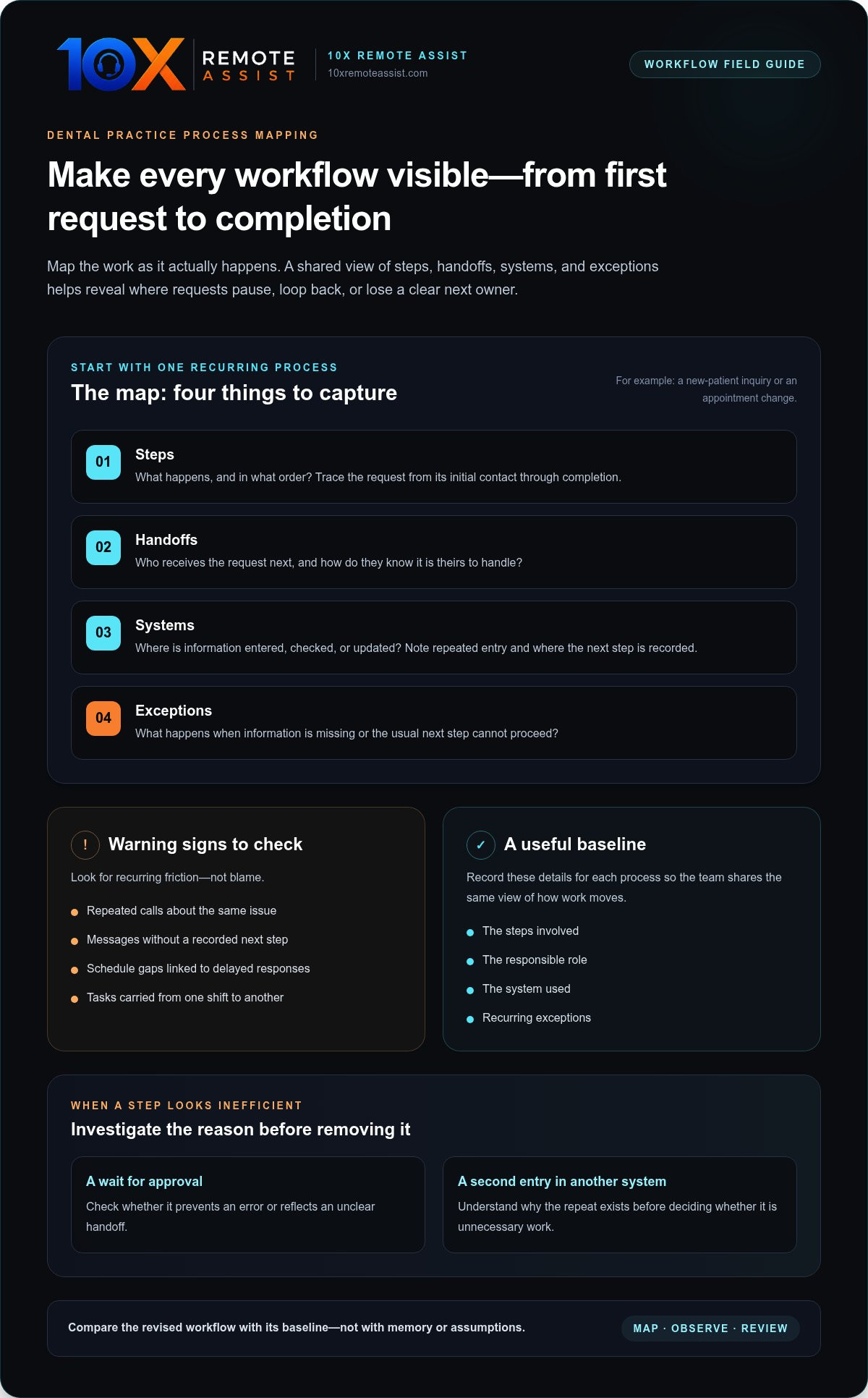
Choose one process that happens regularly, such as a new-patient inquiry or an appointment change. Trace it from the initial request to completion. Record the steps, handoffs, systems, and roles involved, then mark where the process pauses, loops back, or needs information that wasn’t captured earlier.
- Steps: What happens, and in what order?
- Handoffs: Who receives the request next, and how do they know it is theirs to handle?
- Systems: Where is information entered, checked, or updated?
- Exceptions: What happens when information is missing or the usual next step can’t proceed?
For example, an appointment-change map might show a patient calling, a team member checking the schedule, updating the appointment, and recording any follow-up needed. Note whether the change also requires a confirmation or another action. A wait for approval or a second entry in another system is worth investigating, not automatically removing. First understand why it exists and whether it prevents an error or simply repeats work.
Which workflow warning signs should the team look for?
Look for patterns that interrupt patient-facing work or leave requests unresolved: repeated calls about the same issue, messages without a recorded next step, schedule gaps linked to delayed responses, and tasks carried from one shift to another. Ask staff what tends to be delayed, repeated, or returned because information is missing.
Separate one-off exceptions from recurring friction. An unusual request may need individual attention; a repeated pause at the same handoff may point to an unclear process. Focus on what the workflow requires and where it breaks down, rather than assigning blame to the person who last handled the task.
Use a simple baseline to make the map actionable. For each process, note the steps, responsible role, system used, and recurring exceptions. That record gives the team a shared view of how work currently moves. It also makes later reviews more grounded: compare the revised process with its baseline, rather than relying on memory or assumptions.
Improve Dental Front-Office Handoffs Before Adding More Tools
A task can be technically “handled” and still be unfinished if nobody knows who acts next. A scheduling request may move from the phone to the front desk, while an insurance question waits for review and a follow-up message sits in an unassigned queue. Clear ownership closes those gaps. It can also help the team improve a process before adding another tool to manage.
For each recurring workflow, name a role or queue owner responsible for moving the task forward. Then standardize the handoff: what information is needed, where it’s recorded, who receives it, and what counts as complete. For example, a complete handoff might include the patient’s request, the action already taken, any outstanding question, and the person or queue responsible for the next step. An integrated healthcare management review discusses process-focused approaches to dental practice efficiency, reinforcing the value of making workflows visible and manageable.
How to make patient scheduling handoffs more reliable
Before offering appointment options or changing a booking, establish what staff need to know, such as the patient’s request, relevant scheduling details, and any action that remains open. Define who handles confirmations, cancellations, waitlists, and requests that can’t be resolved during the first interaction. Record the next step in a shared system or queue, including who owns it, rather than relying on a verbal reminder.
For more focused strategies, see this guide to dental patient scheduling services.
How to organize insurance and follow-up task ownership
Specify when eligibility information is gathered, where it’s recorded, who reviews it, and how relevant details reach the appropriate team members. If a question is pending, assign the next action and record its status so another team member can see what remains to be done. Use the same approach for claim-status follow-ups: identify the responsible role, document the outstanding item, and make the next step visible. The dental insurance eligibility verification guide offers process-specific detail.
Reliable handoffs define who acts next and where progress is recorded.
Once the practice has identified recurring front-office tasks and clarified ownership, trained human agents can support established processes for calls, scheduling, insurance verification, and follow-up. 10X Remote Assist provides dental front-office support that works as an extension of the dental team. Explore dental front-office support to see how it can reinforce those handoffs.
Measure Dental Workflow Performance Without Chasing Vanity Metrics
Once a handoff is clear, measure whether the process is working reliably. Start with a small set of indicators tied to the workflow, such as whether requests receive a documented next step, how often information must be re-entered, and how many tasks remain unresolved. More activity isn’t automatically better: a higher number of calls handled doesn’t show whether patients got the help they needed or whether follow-up was completed.
For dental practice workflow optimization, use measures to identify patterns, not to assign credit or blame. Pair system records with staff feedback and patient experience signals where available. A resource on how to improve patient handoffs can also help teams consider the quality of information passed between people, not just the number of handoffs completed.
Which dental office workflow measures are useful to track?
Choose indicators that show whether work moves to a clear next step. For a scheduling process, review pending requests, appointment changes, and unfilled openings alongside staff observations about repeat work or interruptions. Check whether each open request has an owner and a recorded action. Keep the measure specific enough that the team can act on what it reveals.
How to compare workflow measures fairly
Use the same observation period and definitions before and after a process change. Note changes in staffing, demand, or procedures that could affect the comparison, and avoid drawing conclusions from one unusually busy day. If you include external outcome statistics, verify the original source, study method, and relevance to your practice before using them.
| Measure | What it reveals | Important limitation |
|---|---|---|
| Requests with a documented next step | Whether incoming work is being advanced and tracked | A recorded action doesn’t prove the request was resolved |
| Rework or repeated data entry | Where information may be missing, duplicated, or difficult to find | Some repeat checks may be necessary |
| Unresolved administrative tasks | Which items remain open or lack clear ownership | A count alone doesn’t explain why tasks are pending |
| Schedule changes and unfilled openings | Patterns in appointment adjustments and available time | These can reflect patient demand, not only workflow quality |
Keep the review balanced. Compare like-for-like processes, ask the team what the figures miss, and treat improvement as a possibility to test rather than a result to claim. If the review identifies recurring front-office capacity gaps, 10X Remote Assist provides dental remote support for established administrative workflows.
Use This Dental Practice Workflow Optimization Checklist to Test Improvements
Turn the workflow audit into a short priority list, not a practice-wide overhaul. Rank recurring problems by patient impact, staff friction, and how often the process occurs. A repeated delay in responding to appointment requests may deserve attention before an occasional administrative exception. Effective dental practice workflow optimization means choosing a change the team can test, observe, and adjust.
Use this checklist to shape a focused pilot:
- Name the problem: Describe the process and the observable sign that shows where it stalls.
- Choose one change: Adjust a specific step, handoff, or ownership rule rather than changing several workflows at once.
- Assign an owner: Identify who will maintain the updated process and gather feedback.
- Document the steps: Clarify roles, handoff expectations, and where staff record progress or exceptions.
- Set a review date: Compare the pilot with its baseline and decide whether to refine, adopt, or stop the change.
A practical sequence for piloting a workflow change
Start with a clear problem statement, such as “appointment-change requests are sometimes left without a recorded next step.” Define the signal you’ll review, then explain the revised roles and documentation expectations to everyone involved. Test the change within a manageable workflow before extending it across the practice. At review, look at process records, staff feedback, and exceptions. If requests still stall, identify the specific step causing the delay. Refine unclear steps before making the workflow standard.
How to reduce change fatigue during workflow improvement
Keep the pilot contained. Changing several connected processes at once can make it harder to identify what helped or created new friction. Tell affected staff what’s changing, why it matters, and where to record issues or edge cases. That gives the team a useful feedback loop instead of another informal workaround. For additional team-workload context, read the dental front-office burnout solutions guide.
A successful pilot is not simply a new procedure on paper. It’s a process the team can follow consistently, with an owner who reviews feedback and keeps the documentation current. If your audit points to recurring front-office tasks that need consistent coverage, explore dental remote support to reinforce established workflows.
Sustain Better Dental Practice Workflows with Clear Ownership and Support
A documented process only stays useful if someone owns it. Assign a role to review the workflow, gather feedback from the people using it, and update the steps when recurring exceptions point to a better approach. This keeps dental practice workflow optimization active rather than turning the checklist into a document no one revisits.
Standardize repeatable administrative steps, such as recording a scheduling request or routing an insurance question to the next owner. Keep room for human judgment when a patient’s situation needs explanation, clarification, or a thoughtful response. Consistency should make communication more dependable, not make it feel impersonal.
When remote front-office support can fit an improved workflow
Once the process is clear, consider whether recurring administrative work competes with in-office responsibilities. Trained remote agents can support phone answering, scheduling, insurance verification, and follow-up as an extension of the existing dental team. A defined workflow gives everyone a shared understanding of what information to capture, where to record progress, and when to pass a request back to practice staff. For a deeper overview, read this guide to dental call center services.
How to maintain visibility and accountability across the workflow
Support is most effective when it fits the practice’s existing operating rhythm. 10X Remote Assist integrates with existing practice management, CRM, and scheduling systems, helping agents work within established workflows. Calls are recorded and evaluated with AI-driven quality scoring, while the agents remain real people. These tools can support review and coaching, helping the team identify where processes are followed consistently and where more guidance may help.
Keep the feedback loop practical: review recurring exceptions, clarify the next action, and make updates available to everyone responsible for the process. Clear ownership, visible progress, and thoughtful communication help administrative work move forward without relying on memory or informal reminders.
For human-led support with dental front-office workflows, explore human-led dental front-office support.
Build a More Reliable Front Office, One Workflow at a Time
Better operations begin with visibility. Map a recurring process to find where work stalls, clarify who owns each handoff, and track a small set of measures that show whether requests move forward. Then test one manageable change, gather feedback, and refine the steps before making them part of the daily routine. That steady approach makes dental practice workflow optimization practical, measurable, and easier for the team to sustain.
When recurring administrative tasks compete with patient-facing responsibilities, trained human agents can support phone answering, scheduling, insurance verification, and follow-up. 10X Remote Assist integrates with existing practice management, CRM, and scheduling systems. Calls are recorded and evaluated with AI-driven quality scoring, while the agents remain real people who bring human communication to front-office support.
Explore human-led dental front-office support to see how it can reinforce the workflows your practice has built. Start with one clear process, keep ownership visible, and build from there. Each thoughtful improvement can make the workday more dependable for your team and patients.
Frequently Asked Questions
How do you optimize workflows in a dental practice?
Start by mapping one recurring administrative process from the first patient request to its final next step. Record who handles each task, where information is stored, and where delays, repeat work, or unclear handoffs occur. Then choose one issue to address, assign an owner, document the revised process, and review whether it improves reliability. Dental practice workflow optimization works best as a measured cycle, not a full-office overhaul.
What are the most common workflow bottlenecks in a dental office?
Common bottlenecks include calls interrupting front-desk work, scheduling requests without a clear owner, repeated data entry, pending insurance questions, and follow-ups that remain unresolved. Tasks passed between team members without a documented next step can also stall. Look for recurring patterns in messages, schedule changes, and unfinished work. Treat these as signs to examine the process, not evidence that an individual team member is the problem.
How can a dental practice reduce front-desk workload without disrupting patient care?
First, identify recurring administrative tasks that pull staff away from patients, then clarify the steps and ownership for each task. Use consistent handoff notes and visible task status so work doesn’t depend on memory. Practices can also use trained human agents for phone answering, scheduling, insurance verification, and follow-up. These agents can support the existing team while patient-facing staff remain focused on in-office responsibilities.
Which dental practice workflow metrics should an office manager track?
Track measures that reveal whether work moves forward: incoming requests with a documented next step, unresolved administrative tasks, repeated data entry, and scheduling changes or unfilled openings. Pair these records with staff feedback and patient experience signals where available. Activity counts alone can mislead. More calls handled, for example, doesn’t show whether questions were resolved. Compare similar processes over a consistent period and note changes that may affect results.
Can remote support integrate with a dental practice management system?
Yes. 10X Remote Assist’s support integrates with existing practice management, CRM, and scheduling systems. This helps trained agents follow established workflows for tasks such as scheduling, insurance verification, and follow-up. Define what information should be recorded, where progress is tracked, and when a request should be passed to practice staff. Clear shared steps help remote support operate as an extension of the dental team.
How often should a dental practice review its workflows?
Review a workflow after testing a change, when recurring exceptions appear, or when staffing, demand, or procedures shift enough to affect how work moves. A review doesn’t need to become a lengthy project. Check whether ownership remains clear, tasks receive documented next steps, and the process still reflects how the team actually works. Regular, focused reviews help keep procedures useful instead of letting outdated instructions become another source of friction.
Does workflow optimization require new software?
No. Many workflow improvements start with clearer ownership, consistent handoff information, and a shared way to record task progress using the systems already in place. Map the process and identify what’s breaking down before deciding whether a tool is needed. If technology is considered later, it should support the improved process, not add extra steps or duplicate records. Improve the handoff first, then assess whether a software change would solve a specific remaining problem.
Frequently Asked Questions
Look for patterns that interrupt patient-facing work or leave requests unresolved: repeated calls about the same issue, messages without a recorded next step, schedule gaps linked to delayed responses, and tasks carried from one shift to another. Ask staff what tends to be delayed, repeated, or returned because information is missing. Separate one-off exceptions from recurring friction. An unusual request may need individual attention; a repeated pause at the same handoff may point to an unclear process. Focus on what the workflow requires and where it breaks down, rather than assigning blame to the person who last handled the task. Use a simple baseline to make the map actionable. For each process, note the steps, responsible role, system used, and recurring exceptions. That record gives the team a shared view of how work currently moves. It also makes later reviews more grounded: compare the revised process with its baseline, rather than relying on memory or assumptions. A task can be technically “handled” and still be unfinished if nobody knows who acts next. A scheduling request may move from the phone to the front desk, while an insurance question waits for review and a follow-up message sits in an unassigned queue. Clear ownership closes those gaps. It can also help the team improve a process before adding another tool to manage. For each recurring workflow, name a role or queue owner responsible for moving the task forward. Then standardize the handoff: what information is needed, where it’s recorded, who receives it, and what counts as complete. For example, a complete handoff might include the patient’s request, the action already taken, any outstanding question, and the person or queue responsible for the next step. An integrated healthcare management review discusses process-focused approaches to dental practice efficiency, reinforcing the value of making workflows visible and manageable.
Choose indicators that show whether work moves to a clear next step. For a scheduling process, review pending requests, appointment changes, and unfilled openings alongside staff observations about repeat work or interruptions. Check whether each open request has an owner and a recorded action. Keep the measure specific enough that the team can act on what it reveals.
Start by mapping one recurring administrative process from the first patient request to its final next step. Record who handles each task, where information is stored, and where delays, repeat work, or unclear handoffs occur. Then choose one issue to address, assign an owner, document the revised process, and review whether it improves reliability. Dental practice workflow optimization works best as a measured cycle, not a full-office overhaul.
Common bottlenecks include calls interrupting front-desk work, scheduling requests without a clear owner, repeated data entry, pending insurance questions, and follow-ups that remain unresolved. Tasks passed between team members without a documented next step can also stall. Look for recurring patterns in messages, schedule changes, and unfinished work. Treat these as signs to examine the process, not evidence that an individual team member is the problem.
First, identify recurring administrative tasks that pull staff away from patients, then clarify the steps and ownership for each task. Use consistent handoff notes and visible task status so work doesn’t depend on memory. Practices can also use trained human agents for phone answering, scheduling, insurance verification, and follow-up. These agents can support the existing team while patient-facing staff remain focused on in-office responsibilities.
Track measures that reveal whether work moves forward: incoming requests with a documented next step, unresolved administrative tasks, repeated data entry, and scheduling changes or unfilled openings. Pair these records with staff feedback and patient experience signals where available. Activity counts alone can mislead. More calls handled, for example, doesn’t show whether questions were resolved. Compare similar processes over a consistent period and note changes that may affect results.
Yes. 10X Remote Assist’s support integrates with existing practice management, CRM, and scheduling systems. This helps trained agents follow established workflows for tasks such as scheduling, insurance verification, and follow-up. Define what information should be recorded, where progress is tracked, and when a request should be passed to practice staff. Clear shared steps help remote support operate as an extension of the dental team.
Review a workflow after testing a change, when recurring exceptions appear, or when staffing, demand, or procedures shift enough to affect how work moves. A review doesn’t need to become a lengthy project. Check whether ownership remains clear, tasks receive documented next steps, and the process still reflects how the team actually works. Regular, focused reviews help keep procedures useful instead of letting outdated instructions become another source of friction.
No. Many workflow improvements start with clearer ownership, consistent handoff information, and a shared way to record task progress using the systems already in place. Map the process and identify what’s breaking down before deciding whether a tool is needed. If technology is considered later, it should support the improved process, not add extra steps or duplicate records. Improve the handoff first, then assess whether a software change would solve a specific remaining problem.
Build the remote team that runs this for you
We recruit, train and manage a dedicated remote team member for your practice.