
A rejected dental claim is not always a dead end. It can point to a fixable submission issue, but the right next step depends on the payer’s status and message. Knowing how to handle dental insurance claim rejections starts with checking those details, not automatically resubmitting the claim. A rejection may indicate a problem that needs correction, while a denial reflects a payer decision that may require an appeal.
These messages can be difficult to interpret, and every correction or follow-up adds work for a busy front office. Treating every returned claim the same way can lead to avoidable delays and repeat work.
This guide explains how to identify the issue, decide whether to correct and resubmit a claim or seek review of a payer decision, and document each action. You’ll also learn how to track deadlines and follow-up consistently, so each rejection becomes a visible workflow task rather than an isolated billing setback.
Key Takeaways
- Confirm the payer’s exact claim status and message before choosing a next step, since terminology can vary.
- Trace the issue to its source, such as patient or eligibility details, claim fields, attachments, or transmission.
- Distinguish a correctable claim error from a payer decision that may call for an appeal.
- Keep each case in one tracked queue with an owner, next action, due date, and status.
- Assess whether your team, software workflow, or trained administrative support can keep claim follow-up consistent and visible.
Dental insurance claim rejection: what it means and why the next step matters
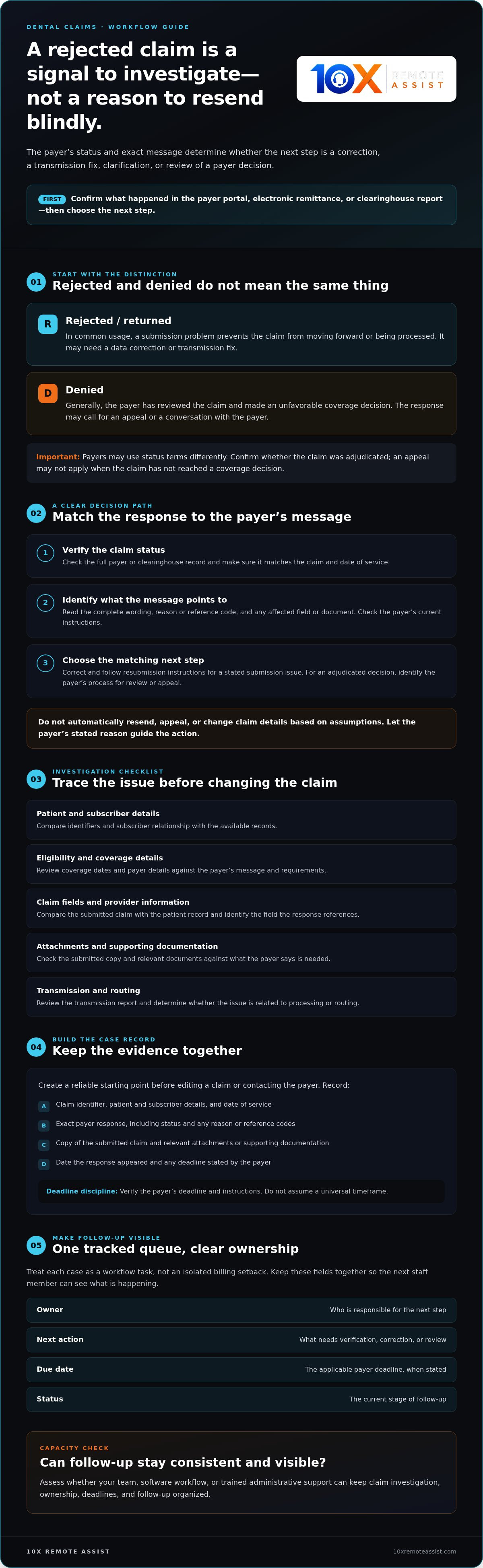
A rejection means a claim cannot move forward in its current form, but payers do not all use the term the same way. Some use “rejected” for claims returned before adjudication; others use different status terms. Check the claim status and full message in the payer portal, electronic remittance, or clearinghouse report before acting.
A claim response is a prompt to verify what happened and choose the next administrative step, not a reason to automatically resend or appeal. A claim that has not been processed may need a data correction or transmission fix. An adjudicated denial may call for an appeal or a conversation with the payer. Understanding how dental insurance works can provide background on plan structures, but the payer’s response and instructions determine what to do with a specific claim.
How is a rejected claim different from a denied claim?
In common usage, a rejected or returned claim has a submission problem that prevents processing. A denied claim has generally been reviewed and received an unfavorable coverage decision. Because payer labels and workflows vary, confirm whether the claim was adjudicated. If a report identifies a formatting issue or missing field, correct the stated problem and follow the payer’s resubmission instructions. An appeal may not apply to a claim that has not reached a coverage decision.
For example, if the payer says an identifier is missing, check the patient record and submitted claim to find where the information is absent or inconsistent. If the response cites a coverage or benefit determination, changing a data field may not resolve the issue. Identify the decision and the payer’s process for requesting review.
What information should the team gather first?
Build a case record before changing the claim or contacting the payer. Start with:
- The claim identifier, patient and subscriber details, and date of service.
- The exact payer response, including its status and any reason or reference codes.
- A copy of the submitted claim and relevant attachments or supporting documentation.
- The date the response appeared and any deadline stated by the payer.
Compare the response with the original submission and identify the field, document, or processing step the payer references. Check the applicable payer instructions and verify deadlines rather than assuming a universal timeframe. This gives the next staff member a reliable starting point and supports a deliberate approach to how to handle dental insurance claim rejections: confirm the status, preserve the evidence, and match the action to the payer’s message.
How to investigate a dental insurance claim rejection step by step
Review the message before editing the claim. A structured check helps the team find the source of the problem instead of making a guess that could create another processing issue. Let the payer’s wording and current instructions guide the investigation.
- Confirm the status. Check the payer portal, electronic remittance, or clearinghouse report to see whether the claim was received, returned, or processed. Confirm that the response belongs to the right claim and date of service.
- Read the full message. Save the exact wording and any accompanying code or reference number. A brief status label may not explain what needs attention.
- Trace the issue. Compare the submitted claim with the patient record, eligibility details, payer requirements, and transmission report. Identify whether the message points to patient data, coverage, a claim field, provider information, an attachment, or routing.
- Assign the next action. Record what needs verification, correction, payer clarification, or further review, and name the person responsible. Confirm the source before changing information.
Let the payer’s stated reason guide the correction. Don’t alter claim details based on assumptions. A documented reason keeps the investigation focused and makes the next action easier to explain and track.
How do you read a payer rejection message?
Open the full payer or clearinghouse record and note the exact message, any code, and the affected claim field or document. Check the payer’s current guidance to interpret the code, since meanings and workflows may differ. If the message is unclear, write down the specific question and claim reference before contacting the payer. This gives the conversation a clear purpose and creates a useful record.
Which common administrative issues should you check?
Compare patient identifiers, subscriber relationship, coverage dates, and payer details with the records available to your team. Then review required claim fields, provider information, service details, and any requested attachments. If the report points to a transmission or formatting issue, check the clearinghouse response and routing information first. Don’t revise clinical documentation to resolve what may be an administrative or transmission error.
Keep the investigation trail with the claim: what was checked, what the payer said, and why the team chose its next step. For a coverage decision that may require review, consult the plan’s process. HealthCare.gov explains internal and external appeals for health insurance decisions, though dental plan requirements should be confirmed with the payer.
If claim investigations are competing with other front-office tasks, dental billing and claims support may help with administrative follow-up as part of your practice workflow.
Correct, resubmit, or appeal? Choose the right response to a rejection
Match the action to the payer’s response. Correct and resubmit when there is a verified submission issue and the payer allows a corrected claim. Consider an appeal when the payer has adjudicated the claim and the practice believes the decision should be reviewed. If the message is unclear, contact the payer before changing or sending anything.
| Situation | Likely administrative action | Records to retain | Confirm with the payer |
|---|---|---|---|
| Fixable claim field or data issue | Correct verified information and submit according to payer instructions | Original response, original and corrected claim copies, correction details | How to identify the corrected claim, submission channel, and deadline |
| Transmission or formatting problem | Resolve the identified technical issue and retransmit if permitted | Clearinghouse report, payer message, transmission record | Whether the claim reached the payer and how to send it again |
| Adjudicated decision the practice believes warrants review | Follow the payer’s appeal or reconsideration process | Decision notice, claim copy, supporting records, appeal correspondence | Filing deadline, required documents, submission channel, and review process |
| Unclear status or response | Contact the payer to clarify the appropriate route | Claim identifier, response text, call date, representative details, instructions received | Whether the claim was adjudicated and what action is expected |
When should a team correct and resubmit a claim?
Use this route when the payer identifies a correctable submission issue and permits resubmission. Verify the affected information against the patient record and payer guidance, and avoid changing unrelated fields. Keep the original and corrected claim, note what changed, and follow the payer’s method for identifying a corrected claim. A correction addresses the submission issue, but it does not guarantee payment.
When might an appeal or payer call be appropriate?
Call when the status or instructions do not make the next step clear. Before appealing, confirm the payer-specific deadline, process, submission channel, supporting documentation, and review path. The American Dental Association’s dental insurance resources can help practices find guidance on claims and appeals. If the dispute depends on clinical interpretation, refer it to the appropriate licensed dental professional.
A practical approach to how to handle dental insurance claim rejections is to document the reason, action, records retained, and payer instructions for every case. Follow the payer’s stated deadline and requirements rather than assuming one process applies across plans.
Build a repeatable rejection-resolution workflow for your dental office
A reliable process makes each rejection visible from first review through follow-up. Keep one shared queue rather than relying on separate notes, inboxes, or staff memory. Each case needs an owner, reason, next action, due date, and current status. Set follow-up based on the payer’s instructions rather than an assumed deadline that may not apply to the plan.
What should a rejection tracking log include?
Use the log to support a handoff, not to duplicate the entire patient record. Include the claim identifier, payer, rejection message, date received, action taken, resubmission date if applicable, follow-up result, next step, and assigned owner. Store identifiable claim details securely and limit access to staff who need them. For payer calls, record the date, reference details, instructions received, and next follow-up according to office policy.
A simple status sequence can keep work moving: new, under review, waiting on information, corrected or appealed, follow-up due, resolved. Set a review rhythm that fits the team’s workload, then use the payer’s requirements to set each claim’s actual due date. When ownership changes, update the queue so the next person can see what has happened and what remains outstanding.
How can teams reduce repeat administrative rejections?
Review the queue during routine billing workflow checks. Group recurring issues by payer and administrative category, such as patient data, eligibility details, missing attachments, or transmission problems. A pattern can point to a step worth checking, but it does not prove the payer made an error. Compare examples with current payer guidance before changing a process.
Use verified patient information during intake and claim preparation, and confirm plan details when needed. For more context on eligibility checks, see the dental insurance eligibility verification guide. For broader workflow ideas, the dental billing and claims support guide offers related context.
Review recurring causes, refine the administrative steps, and monitor whether similar issues continue. A consistent queue also makes it easier to see when follow-up is outpacing in-house capacity. If your team needs support with billing, claims, or claim-status follow-up, dental billing and claims support may fit into your administrative workflow.
When dental claim follow-up needs more support
Consider additional support when claim follow-ups keep aging, ownership is unclear, or staff cannot apply the same process consistently. Start by reviewing the queue. Are due dates being missed? Do unresolved claims build up when a team member is away? Are staff repeatedly switching between payer portals and other front-office work? These patterns can help distinguish a workload problem from a visibility or handoff issue.
Compare support options by who owns the work and how the practice can see its status:
- In-house handling: Practice staff manage each claim directly. Assign a named owner and backup, and use a shared tracker to keep progress visible.
- Software workflows: Tools can organize claim information and follow-up tasks. Confirm what the software tracks and which staff member reviews exceptions and completes each action.
- Trained administrative support: A remote team can take on agreed billing, claims, or claim-status follow-up tasks. Define how work is assigned, documented, and handed back to practice staff.
What should a practice evaluate before outsourcing follow-up?
Start with scope. Confirm which administrative tasks are included, how claims are assigned, and how unclear responses or other exceptions are escalated. Ask how the team will work within your existing practice management and CRM systems. Clarify privacy safeguards, access permissions, documentation practices, and communication expectations before transferring work. Clear boundaries make the arrangement easier to oversee.
How can remote support fit into the existing team?
Map each handoff: who reviews a rejection, who follows up with the payer, and who updates the claim record. Keep clinical decisions and payer-specific authorization with appropriately qualified practice personnel. Ask the provider how calls are recorded, evaluated through quality scoring, and reflected in operational reporting. Agree on how updates reach your in-house team so claim status remains visible.
10X Remote Assist provides trained human dental administrative support, including billing and claims support and claim-status follow-up. Its workflows can integrate with existing practice management and CRM systems. For practices deciding how to handle dental insurance claim rejections while follow-up competes with other front-office demands, this can be an operational support option, not a replacement for the practice’s clinical judgment or oversight.
Review your workflow, then explore 10X Remote Assist to see whether dental administrative support fits your team’s follow-up needs.
Make Every Claim Follow-Up Clear and Accountable
A rejected claim needs a specific next step, not an automatic resubmission. Confirm the payer’s status and message, then decide whether to correct a verified submission issue, contact the payer, or seek review of an adjudicated decision. Keep each case in a shared queue with an owner, action, due date, and documented follow-up.
That is the foundation of handling dental insurance claim rejections consistently. A repeatable process helps your team see what is unresolved, follow payer-specific instructions, and spot administrative issues worth reviewing without assuming the cause.
If claim follow-up is stretching your in-house team, 10X Remote Assist provides trained human agents for dental administrative workflows, including billing, claims support, and claim-status follow-up. Its workflows can integrate with existing practice management and CRM systems. Explore dental administrative support from 10X Remote Assist to see whether it fits your practice’s needs.
With clear ownership and a reliable workflow, your team can approach each claim with greater confidence and keep follow-up moving.
Frequently Asked Questions
What should I do first when a dental insurance claim is rejected?
Confirm the claim’s status and read the payer’s exact message before changing or resubmitting anything. Compare the response with the original claim and related clearinghouse or remittance records to identify what needs attention. Assign an owner, record the payer’s instructions and the date received, and verify any deadline directly with the payer. This first review helps you decide how to handle dental insurance claim rejections without relying on assumptions.
Is a rejected dental claim the same as a denied claim?
Not always. A rejection often means the claim could not be processed as submitted, while a denial may follow the payer’s review of the claim. Payers and clearinghouses can use these terms differently, so check the detailed response and status in the payer portal. Ask the payer whether the claim was adjudicated and which resolution route applies. Don’t rely on the label alone to decide whether to correct, resubmit, or appeal.
Can I resubmit a rejected dental insurance claim?
Yes, if the payer identifies a correctable submission issue and allows resubmission. Verify what needs to change and follow the payer’s instructions. Ask whether the claim must be identified as corrected or replacement, and confirm the submission channel and deadline. Keep copies of the original and revised claims, the payer response, and any submission confirmation. These records help you track whether the updated claim was received and processed.
How do I find out why a dental claim was rejected?
Review the complete payer or clearinghouse response, including its message and any associated code. Compare the stated issue with the submitted claim, patient and eligibility information, and required attachments. If the response refers to a missing document, check the payer’s instructions for that claim. If the reason remains unclear, contact the payer and document its guidance. Use current payer-specific references because terminology and code meanings can vary.
Should I appeal or correct a rejected dental claim?
Correct and resubmit when the payer identifies a fixable submission issue and permits that route. Consider an appeal when the claim has been adjudicated and the practice believes the decision should be reviewed. Confirm the claim status, payer process, required documentation, and deadline before proceeding. If the issue involves clinical interpretation, ask an appropriately qualified dental professional to review it. A data correction and an appeal address different problems, so choosing the right path matters.
What information should we track after correcting a claim?
Track the claim identifier, payer response, verified reason, assigned owner, action taken, submission date, and next follow-up date. Record payer conversations and reference details, then update the claim’s status when a response arrives. Keep patient information secure and follow office policies for access and record retention. A consistent log supports clear handoffs, helps avoid duplicate work, and makes recurring administrative issues easier to review.
Can a dental billing support team follow up on rejected claims?
Yes. Depending on the agreed scope, administrative support may help manage claim records, make status inquiries, document payer responses, and maintain follow-up queues. 10X Remote Assist provides trained human agents for dental front-office workflows, including billing, claims support, and claim-status follow-up. Clarify access, responsibilities, documentation, and escalation paths. Clinical decisions should remain with appropriately qualified practice personnel.
Frequently Asked Questions
In common usage, a rejected or returned claim has a submission problem that prevents processing. A denied claim has generally been reviewed and received an unfavorable coverage decision. Because payer labels and workflows vary, confirm whether the claim was adjudicated. If a report identifies a formatting issue or missing field, correct the stated problem and follow the payer’s resubmission instructions. An appeal may not apply to a claim that has not reached a coverage decision. For example, if the payer says an identifier is missing, check the patient record and submitted claim to find where the information is absent or inconsistent. If the response cites a coverage or benefit determination, changing a data field may not resolve the issue. Identify the decision and the payer’s process for requesting review.
Build a case record before changing the claim or contacting the payer. Start with: Compare the response with the original submission and identify the field, document, or processing step the payer references. Check the applicable payer instructions and verify deadlines rather than assuming a universal timeframe. This gives the next staff member a reliable starting point and supports a deliberate approach to how to handle dental insurance claim rejections: confirm the status, preserve the evidence, and match the action to the payer’s message. Review the message before editing the claim. A structured check helps the team find the source of the problem instead of making a guess that could create another processing issue. Let the payer’s wording and current instructions guide the investigation. Let the payer’s stated reason guide the correction. Don’t alter claim details based on assumptions. A documented reason keeps the investigation focused and makes the next action easier to explain and track.
Open the full payer or clearinghouse record and note the exact message, any code, and the affected claim field or document. Check the payer’s current guidance to interpret the code, since meanings and workflows may differ. If the message is unclear, write down the specific question and claim reference before contacting the payer. This gives the conversation a clear purpose and creates a useful record.
Compare patient identifiers, subscriber relationship, coverage dates, and payer details with the records available to your team. Then review required claim fields, provider information, service details, and any requested attachments. If the report points to a transmission or formatting issue, check the clearinghouse response and routing information first. Don’t revise clinical documentation to resolve what may be an administrative or transmission error. Keep the investigation trail with the claim: what was checked, what the payer said, and why the team chose its next step. For a coverage decision that may require review, consult the plan’s process. HealthCare.gov explains internal and external appeals for health insurance decisions, though dental plan requirements should be confirmed with the payer. If claim investigations are competing with other front-office tasks, dental billing and claims support may help with administrative follow-up as part of your practice workflow. Match the action to the payer’s response. Correct and resubmit when there is a verified submission issue and the payer allows a corrected claim. Consider an appeal when the payer has adjudicated the claim and the practice believes the decision should be reviewed. If the message is unclear, contact the payer before changing or sending anything.
Use this route when the payer identifies a correctable submission issue and permits resubmission. Verify the affected information against the patient record and payer guidance, and avoid changing unrelated fields. Keep the original and corrected claim, note what changed, and follow the payer’s method for identifying a corrected claim. A correction addresses the submission issue, but it does not guarantee payment.
Call when the status or instructions do not make the next step clear. Before appealing, confirm the payer-specific deadline, process, submission channel, supporting documentation, and review path. The American Dental Association’s dental insurance resources can help practices find guidance on claims and appeals. If the dispute depends on clinical interpretation, refer it to the appropriate licensed dental professional. A practical approach to how to handle dental insurance claim rejections is to document the reason, action, records retained, and payer instructions for every case. Follow the payer’s stated deadline and requirements rather than assuming one process applies across plans. A reliable process makes each rejection visible from first review through follow-up. Keep one shared queue rather than relying on separate notes, inboxes, or staff memory. Each case needs an owner, reason, next action, due date, and current status. Set follow-up based on the payer’s instructions rather than an assumed deadline that may not apply to the plan.
Use the log to support a handoff, not to duplicate the entire patient record. Include the claim identifier, payer, rejection message, date received, action taken, resubmission date if applicable, follow-up result, next step, and assigned owner. Store identifiable claim details securely and limit access to staff who need them. For payer calls, record the date, reference details, instructions received, and next follow-up according to office policy. A simple status sequence can keep work moving: new, under review, waiting on information, corrected or appealed, follow-up due, resolved. Set a review rhythm that fits the team’s workload, then use the payer’s requirements to set each claim’s actual due date. When ownership changes, update the queue so the next person can see what has happened and what remains outstanding.
Review the queue during routine billing workflow checks. Group recurring issues by payer and administrative category, such as patient data, eligibility details, missing attachments, or transmission problems. A pattern can point to a step worth checking, but it does not prove the payer made an error. Compare examples with current payer guidance before changing a process. Use verified patient information during intake and claim preparation, and confirm plan details when needed. For more context on eligibility checks, see the dental insurance eligibility verification guide. For broader workflow ideas, the dental billing and claims support guide offers related context. Review recurring causes, refine the administrative steps, and monitor whether similar issues continue. A consistent queue also makes it easier to see when follow-up is outpacing in-house capacity. If your team needs support with billing, claims, or claim-status follow-up, dental billing and claims support may fit into your administrative workflow. Consider additional support when claim follow-ups keep aging, ownership is unclear, or staff cannot apply the same process consistently. Start by reviewing the queue. Are due dates being missed? Do unresolved claims build up when a team member is away? Are staff repeatedly switching between payer portals and other front-office work? These patterns can help distinguish a workload problem from a visibility or handoff issue. Compare support options by who owns the work and how the practice can see its status:
Start with scope. Confirm which administrative tasks are included, how claims are assigned, and how unclear responses or other exceptions are escalated. Ask how the team will work within your existing practice management and CRM systems. Clarify privacy safeguards, access permissions, documentation practices, and communication expectations before transferring work. Clear boundaries make the arrangement easier to oversee.
Map each handoff: who reviews a rejection, who follows up with the payer, and who updates the claim record. Keep clinical decisions and payer-specific authorization with appropriately qualified practice personnel. Ask the provider how calls are recorded, evaluated through quality scoring, and reflected in operational reporting. Agree on how updates reach your in-house team so claim status remains visible. 10X Remote Assist provides trained human dental administrative support, including billing and claims support and claim-status follow-up. Its workflows can integrate with existing practice management and CRM systems. For practices deciding how to handle dental insurance claim rejections while follow-up competes with other front-office demands, this can be an operational support option, not a replacement for the practice’s clinical judgment or oversight. Review your workflow, then explore 10X Remote Assist to see whether dental administrative support fits your team’s follow-up needs. A rejected claim needs a specific next step, not an automatic resubmission. Confirm the payer’s status and message, then decide whether to correct a verified submission issue, contact the payer, or seek review of an adjudicated decision. Keep each case in a shared queue with an owner, action, due date, and documented follow-up. That is the foundation of handling dental insurance claim rejections consistently. A repeatable process helps your team see what is unresolved, follow payer-specific instructions, and spot administrative issues worth reviewing without assuming the cause. If claim follow-up is stretching your in-house team, 10X Remote Assist provides trained human agents for dental administrative workflows, including billing, claims support, and claim-status follow-up. Its workflows can integrate with existing practice management and CRM systems. Explore dental administrative support from 10X Remote Assist to see whether it fits your practice’s needs. With clear ownership and a reliable workflow, your team can approach each claim with greater confidence and keep follow-up moving.
Confirm the claim’s status and read the payer’s exact message before changing or resubmitting anything. Compare the response with the original claim and related clearinghouse or remittance records to identify what needs attention. Assign an owner, record the payer’s instructions and the date received, and verify any deadline directly with the payer. This first review helps you decide how to handle dental insurance claim rejections without relying on assumptions.
Not always. A rejection often means the claim could not be processed as submitted, while a denial may follow the payer’s review of the claim. Payers and clearinghouses can use these terms differently, so check the detailed response and status in the payer portal. Ask the payer whether the claim was adjudicated and which resolution route applies. Don’t rely on the label alone to decide whether to correct, resubmit, or appeal.
Yes, if the payer identifies a correctable submission issue and allows resubmission. Verify what needs to change and follow the payer’s instructions. Ask whether the claim must be identified as corrected or replacement, and confirm the submission channel and deadline. Keep copies of the original and revised claims, the payer response, and any submission confirmation. These records help you track whether the updated claim was received and processed.
Review the complete payer or clearinghouse response, including its message and any associated code. Compare the stated issue with the submitted claim, patient and eligibility information, and required attachments. If the response refers to a missing document, check the payer’s instructions for that claim. If the reason remains unclear, contact the payer and document its guidance. Use current payer-specific references because terminology and code meanings can vary.
Correct and resubmit when the payer identifies a fixable submission issue and permits that route. Consider an appeal when the claim has been adjudicated and the practice believes the decision should be reviewed. Confirm the claim status, payer process, required documentation, and deadline before proceeding. If the issue involves clinical interpretation, ask an appropriately qualified dental professional to review it. A data correction and an appeal address different problems, so choosing the right path matters.
Track the claim identifier, payer response, verified reason, assigned owner, action taken, submission date, and next follow-up date. Record payer conversations and reference details, then update the claim’s status when a response arrives. Keep patient information secure and follow office policies for access and record retention. A consistent log supports clear handoffs, helps avoid duplicate work, and makes recurring administrative issues easier to review.
Yes. Depending on the agreed scope, administrative support may help manage claim records, make status inquiries, document payer responses, and maintain follow-up queues. 10X Remote Assist provides trained human agents for dental front-office workflows, including billing, claims support, and claim-status follow-up. Clarify access, responsibilities, documentation, and escalation paths. Clinical decisions should remain with appropriately qualified practice personnel.
Build the remote team that runs this for you
We recruit, train and manage a dedicated remote team member for your practice.