
What if the right virtual dental receptionist did more than answer calls and worked as a connected extension of your front desk? When patient requests compete with check-ins, scheduling, and other daily responsibilities, support is most useful when it fits the way your practice already works.
It’s reasonable to ask whether remote support can follow dental workflows without making patient conversations feel impersonal. The answer depends on the tasks the service handles, how it coordinates with your systems, and whether patients speak with trained people or automated technology. These differences affect both the patient experience and the support your team receives.
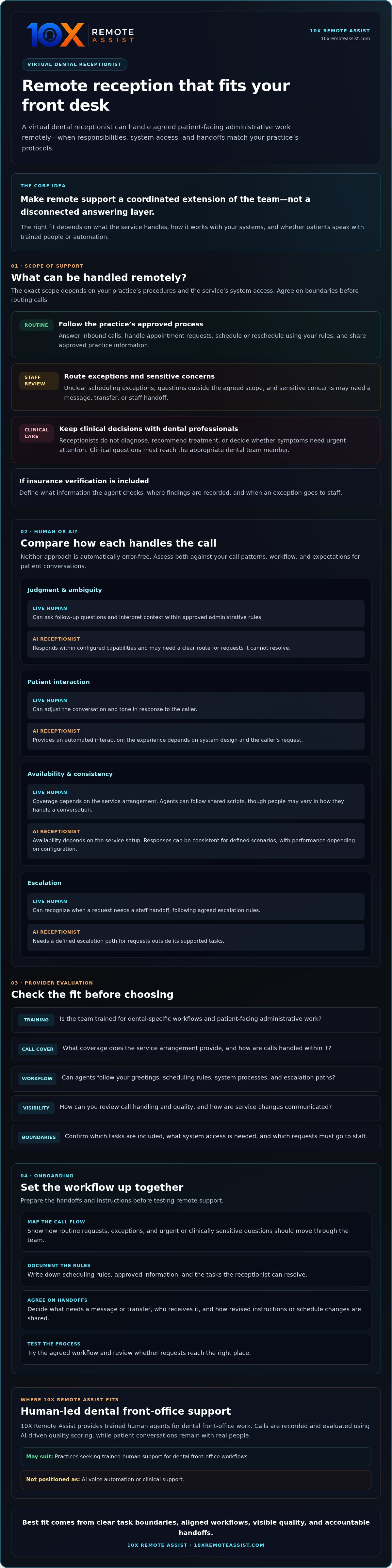
This guide explains which front-office tasks can be handled remotely, how human-led reception compares with automation, and what to assess before choosing a service. Use the practical checks below to evaluate workflow fit, call handling, quality visibility, and onboarding. The goal is to find support that eases pressure on your team while keeping patient communication personal and accountable.
Key Takeaways
- A virtual dental receptionist can support patient-facing administrative work remotely, but the exact scope depends on your practice’s protocols and system access.
- Compare human and AI options by how they handle patient conversations, judgment, consistency, and escalation.
- Check dental-specific training, call coverage, workflow fit, and how service changes are communicated before choosing a provider.
- Prepare for onboarding by mapping call flows, documenting scheduling rules, and agreeing on handoffs before testing the process.
- 10X Remote Assist may suit practices seeking trained human support for dental front-office workflows, not AI voice automation or clinical support.
What a Virtual Dental Receptionist Does for a Practice
A virtual dental receptionist is a remote, live administrative professional who handles agreed patient-facing tasks, such as answering calls, scheduling appointments, and routing requests according to a dental practice’s protocols.
The role is a dental-focused form of virtual assistant support, but responsibilities vary by provider, practice procedures, and system access. Set clear boundaries: receptionists can share practice-approved administrative information, but they don’t diagnose conditions, recommend treatment, or make clinical decisions.
Which front-desk tasks can a virtual dental receptionist handle?
Agree on the scope before calls are routed. Depending on the service, a remote receptionist may answer inbound calls, schedule or reschedule appointments using your rules, and follow up on administrative requests. If insurance verification is included, define what information the agent checks, where findings are recorded, and when an exception goes to staff.
Some requests follow a routine process; others need a handoff. Confirming an appointment may be straightforward. A patient asking whether a symptom needs urgent attention should be routed to the appropriate in-office team member, not given a clinical answer by reception.
- Routine: Appointment requests, rescheduling, and approved practice information.
- Needs staff review: Unclear scheduling exceptions, sensitive concerns, or questions outside the agreed scope.
- Clinical: Symptoms, diagnosis, and treatment decisions belong with qualified dental professionals.
How does remote reception fit into a dental team?
Remote support works best when agents use the same approved greetings, scheduling rules, and escalation paths as your in-office front desk. Decide what the receptionist can resolve, what needs a message or transfer, and how urgent or clinically sensitive questions reach staff. These details make the remote role part of a coordinated workflow rather than a disconnected answering layer.
Before onboarding, identify the information and system access needed for each task, and decide how staff will share schedule changes or revised instructions. For a broader look at how phone support can fit into dental administration, see The Ultimate Guide to Dental Call Center Services in 2026.
10X Remote Assist provides trained human agents for dental front-office work. Calls are recorded and evaluated using AI-driven quality scoring, while patient conversations remain with real people.
Human Virtual Receptionists vs. AI: What Changes for Dental Patients?
The difference isn’t simply a person versus a voice interface. It’s how each option handles ambiguity, adapts to a patient’s needs, and routes requests that fall outside routine service. Neither approach is automatically error-free. Compare them against your call patterns, workflows, and expectations for patient conversations.
Practical criterion
Live human receptionist
AI receptionist
Judgment
Can ask follow-up questions and interpret context within the practice’s approved administrative rules.
Responds according to its configured capabilities and may need a clear route for requests it can’t resolve.
Patient interaction
Can adjust conversation and tone in response to the caller.
Offers an automated interaction; the experience depends on the system’s design and the caller’s request.
Availability and consistency
Coverage depends on the service arrangement. Agents can follow shared scripts, though people may vary in how they handle a conversation.
Availability depends on the service setup. Responses can be consistent for defined scenarios, but performance depends on configuration.
Escalation
Can recognize when a request needs a staff handoff, following agreed escalation rules.
Needs a defined escalation path for requests outside its supported tasks.
When does a live dental receptionist add practical value?
A caller may want to move an appointment but have limited availability, need a particular visit type, or be unsure which scheduling option fits your rules. A live agent can clarify administrative details, ask follow-up questions, and route an exception to staff instead of forcing the request into a standard flow. That’s administrative judgment, not clinical judgment: symptoms and treatment questions still belong with the dental team.
When comparing a virtual dental receptionist with automation, review the calls that most often require clarification or a personal handoff. Decide in advance what should happen when a caller’s need is unclear.
What can AI quality scoring tell a practice?
Recorded calls can be reviewed against defined service expectations, such as whether an approved greeting was used or a request was routed as instructed. AI-driven scoring can help organize that review and flag calls for closer attention. It doesn’t make human agents AI voices, and it shouldn’t replace human oversight. Practice leaders still need to consider context and decide whether coaching or workflow changes are appropriate.
For more detail on measurement, see Dental Call Quality Scoring: How Data Improves Care. Practices assessing how patient information is handled can also consult the U.S. Department of Health & Human Services’ HIPAA compliance resources and verify relevant obligations for their arrangement.
Practices that value live patient conversations can explore human dental reception support as one option for front-office workflows.
How to Evaluate a Virtual Dental Receptionist Service
Assess the operating process, not just the task list. A virtual dental receptionist service should have a clear scope, defined call coverage, and a reliable way to follow your practice’s instructions. Ask providers how each element works in day-to-day situations, including when a call is unusual or a system is unavailable.
Use these questions to compare options:
- Training: How do agents learn your practice protocols, and how are updates shared when those protocols change?
- Scope: Which calls and administrative tasks are included, and what falls outside the service?
- Escalation: Who handles urgent calls, appointment conflicts, and requests that an agent can’t resolve?
- Coverage: What call hours and volume does the proposed arrangement cover? Confirm the terms rather than assuming availability.
- Oversight: Are calls recorded? Who can access them, how are they reviewed, and what reporting is available?
Questions to ask about training, workflows, and oversight
Look for a repeatable process. Ask how agents receive approved greetings, scheduling rules, and patient communication guidance, then how revised instructions reach the team. Clarify who can authorize changes and how exceptions are documented. If calls are recorded and evaluated with AI-driven scoring, ask what the scoring assesses, who reviews the results, and how concerns are escalated. Treat scoring as one part of oversight, not a substitute for human review.
Review the agreement and ask how patient information is handled, what safeguards apply, and which responsibilities belong to your practice or the provider. Verify relevant privacy and contractual terms directly. Rather than relying on a general compliance statement, review the details that apply to your arrangement.
How to assess practice-management system integration
Start with the task. Does scheduling require the agent to view availability, enter appointments, or pass requests to staff? Does the agreed scope include updating patient records or checking specific information? List the tasks, then confirm which systems and permissions the provider supports. Check compatibility before designing the workflow, and grant only the access required for agreed responsibilities.
Test the process before relying on it for routine calls. Use sample scenarios to check appointment handling, exception routing, and handoffs. For additional implementation considerations, see Integrating Remote Teams into Your Practice Management System.
What to Expect When Adding Remote Reception Support
A smooth transition starts before the first patient call. Treat onboarding as shared workflow design: your practice explains how reception should operate, and the provider confirms how agents will follow those instructions. The details depend on your requirements, selected scope, and system access, so work through them before launch.
- Map call flows: List common call reasons and the route each should take.
- Agree on scope: Define which tasks agents can complete and which require a staff handoff.
- Configure access: Confirm supported systems, permissions, and approved information access.
- Test scenarios: Walk through routine requests, exceptions, and system problems before launch.
- Review and adjust: Use agreed criteria to identify unclear instructions and refine the workflow.
Prepare call flows and practice protocols
Document the details agents need to act consistently: approved greetings, appointment types and scheduling rules, common administrative questions, and requests that must go to staff. Be explicit about boundaries. Specify what information agents may access, which tasks they may complete, and who receives complex, urgent, or clinically sensitive questions.
Plan for disruptions as well. Agree on what agents should do if a scheduling system is unavailable or call volume exceeds the expected workflow. Set a backup contact and a clear method for recording requests that can’t be completed immediately.
Introduce the remote team to in-office staff before calls are routed. Explain each role, how handoffs will arrive, and who owns follow-up. Patients experience one practice, so staff should understand what the receptionist can handle and what remains their responsibility.
Review performance after launch
Early review helps turn the written process into a dependable routine. Agree on call-quality criteria, then review available recordings to check whether greetings, scheduling instructions, and escalation steps were followed. Recordings and AI-driven scoring can help identify calls for closer review, but a person should assess context and decide whether coaching or a protocol update is needed.
Review practical workflow signals such as scheduling accuracy, completed handoffs, and requests left unresolved. Discuss patterns with the provider, clarify confusing instructions, and share approved changes with both remote and in-office teams. Treat the first review as a calibration point, not a verdict.
Clear role boundaries can also support a more sustainable front desk workload. For related ideas, see How to Reduce Dental Front Desk Turnover: Myths, Causes, and Practical Fixes.
To discuss how a virtual dental receptionist could fit your practice’s call flows and front-office routines, explore reception support with 10X Remote Assist.
Is 10X Remote Assist the Right Virtual Dental Receptionist Partner?
The right fit depends on what your practice needs from patient-facing support. 10X Remote Assist may suit a dental team looking for trained human agents to help manage front-office workflows and keep patient conversations live. It is not an AI voice automation service and does not provide clinical support, diagnosis, or treatment decisions.
Where 10X Remote Assist fits
Agents can support phone answering, patient scheduling, insurance verification, and follow-up within the agreed scope. They work as an extension of the dental team, following practice protocols and coordinating with in-office staff on handoffs. The service integrates with existing practice-management, CRM, and scheduling systems. Confirm that the specific systems and workflows your practice needs are supported.
Calls are recorded and evaluated using AI-driven quality scoring. This gives the practice a way to review interactions while agents remain real people. Recording and scoring are oversight tools, not a promise of a particular result. Ask how access, review, and feedback are handled as part of your evaluation.
How to decide whether to take the next step
Start with the pressure points your team wants to address. Identify which calls take the most front-desk time, where requests tend to stall, and which administrative tasks could be handled remotely. Then confirm the practical fit before choosing a service:
- Scope: Which calls, scheduling tasks, verification, and follow-up can the service handle?
- System compatibility: Are your current systems and required workflows supported, and what access is needed?
- Oversight: How are calls recorded, reviewed, and made available to your practice?
- Onboarding: How will agents learn your protocols, receive updates, and hand off exceptions to staff?
A virtual dental receptionist is most useful when the defined role fits your workflow and expectations for patient communication. If your priority is live administrative support rather than an automated voice or clinical service, contact 10X Remote Assist to discuss workflow fit, integration requirements, and service scope.
Choose Support That Fits Your Practice
The right virtual dental receptionist is more than an answering layer. It’s support shaped around your practice’s call flows, agreed responsibilities, system access, and handoff expectations. Compare human-led service with automation by considering how each handles nuanced requests, consistent instructions, and escalation.
Before choosing, identify where your front desk needs the most support, confirm which tasks are in scope, and map out onboarding and ongoing review. 10X Remote Assist provides live, trained human agents for dental front-office tasks. Calls are recorded and evaluated with AI-driven quality scoring, and the service integrates with practice-management, CRM, and scheduling systems. Confirm that the systems and workflows your practice needs are supported as part of your evaluation.
Ready to explore how reception support could fit your practice? Discuss your dental front-office workflows with 10X Remote Assist. Start with the calls and administrative tasks creating the most friction, then discuss a scope and handoff process that fits your team.
Frequently Asked Questions
What does a virtual dental receptionist do?
A virtual dental receptionist provides remote administrative support for a dental practice, commonly answering calls and helping manage patient scheduling. Depending on the agreed scope, the role may also include follow-up or insurance verification. Agents can follow practice-approved procedures, but they don’t replace clinicians or provide treatment advice. Before starting, confirm which tasks agents can complete, when they should escalate calls, and what system access they need.
Can a virtual dental receptionist schedule appointments in my practice-management system?
Remote reception workflows can connect with a practice’s scheduling or practice-management system, but supported systems and access vary by provider. Ask whether agents can view availability, book or change appointments, and record schedule updates. Confirm what permissions are needed and how appointment conflicts, exceptions, and handoffs will be handled. Don’t assume your specific setup is compatible until the provider confirms it.
Is a human virtual dental receptionist better than an AI receptionist?
Neither option is universally better; the right choice depends on your call types, patient expectations, and workflow. Human agents can ask clarifying questions and follow practice-specific escalation rules. AI tools may automate routine interactions. Compare how each handles accuracy, patient experience, oversight, integrations, privacy practices, and requests it can’t resolve. Assess the service against your actual needs rather than relying on availability claims alone.
How does a virtual dental receptionist handle insurance verification?
Some services include insurance verification, while others treat it as a separate workflow. Confirm whether agents check eligibility, prepare benefit information, or route requests to your team. Ask what information they need, how findings are documented, and how exceptions are escalated. Verification isn’t a guarantee of payment or final coverage, so establish how your practice communicates that distinction to patients and handles questions that require staff review.
Will patients know they’re speaking with a remote receptionist?
A remote receptionist is a person handling calls from outside the practice, and the experience depends partly on your greeting and disclosure preferences. Agree on how agents introduce themselves, represent the practice, and transfer calls. A clear, consistent script helps connect the conversation to your team without suggesting the agent is physically in the office. Make sure in-office staff understand the agent’s role and how handoffs will reach them.
Are calls with a virtual dental receptionist recorded?
Recording practices vary, so ask whether calls are recorded, who can access them, how they’re used for quality review, and what retention or deletion practices apply. Confirm relevant consent and privacy requirements with your compliance advisor or qualified counsel. 10X Remote Assist records calls and evaluates them using AI-driven quality scoring, while agents remain real people. Verify current recording and review details directly with the provider before choosing a service.
How do I know if my dental practice needs virtual receptionist support?
Look for recurring bottlenecks, such as calls competing with in-person check-in, delayed callbacks, scheduling work piling up, or staff frequently switching between patient-facing and administrative tasks. Map which call types and duties create the most friction, then compare them with a provider’s agreed scope. A focused workflow review can help you determine whether remote support addresses a specific need or adds unnecessary complexity.
Frequently Asked Questions
Agree on the scope before calls are routed. Depending on the service, a remote receptionist may answer inbound calls, schedule or reschedule appointments using your rules, and follow up on administrative requests. If insurance verification is included, define what information the agent checks, where findings are recorded, and when an exception goes to staff. Some requests follow a routine process; others need a handoff. Confirming an appointment may be straightforward. A patient asking whether a symptom needs urgent attention should be routed to the appropriate in-office team member, not given a clinical answer by reception.
Remote support works best when agents use the same approved greetings, scheduling rules, and escalation paths as your in-office front desk. Decide what the receptionist can resolve, what needs a message or transfer, and how urgent or clinically sensitive questions reach staff. These details make the remote role part of a coordinated workflow rather than a disconnected answering layer. Before onboarding, identify the information and system access needed for each task, and decide how staff will share schedule changes or revised instructions. For a broader look at how phone support can fit into dental administration, see The Ultimate Guide to Dental Call Center Services in 2026. 10X Remote Assist provides trained human agents for dental front-office work. Calls are recorded and evaluated using AI-driven quality scoring, while patient conversations remain with real people. The difference isn’t simply a person versus a voice interface. It’s how each option handles ambiguity, adapts to a patient’s needs, and routes requests that fall outside routine service. Neither approach is automatically error-free. Compare them against your call patterns, workflows, and expectations for patient conversations. Practical criterion Live human receptionist AI receptionist Judgment Can ask follow-up questions and interpret context within the practice’s approved administrative rules. Responds according to its configured capabilities and may need a clear route for requests it can’t resolve. Patient interaction Can adjust conversation and tone in response to the caller. Offers an automated interaction; the experience depends on the system’s design and the caller’s request. Availability and consistency Coverage depends on the service arrangement. Agents can follow shared scripts, though people may vary in how they handle a conversation. Availability depends on the service setup. Responses can be consistent for defined scenarios, but performance depends on configuration. Escalation Can recognize when a request needs a staff handoff, following agreed escalation rules. Needs a defined escalation path for requests outside its supported tasks.
A caller may want to move an appointment but have limited availability, need a particular visit type, or be unsure which scheduling option fits your rules. A live agent can clarify administrative details, ask follow-up questions, and route an exception to staff instead of forcing the request into a standard flow. That’s administrative judgment, not clinical judgment: symptoms and treatment questions still belong with the dental team. When comparing a virtual dental receptionist with automation, review the calls that most often require clarification or a personal handoff. Decide in advance what should happen when a caller’s need is unclear.
Recorded calls can be reviewed against defined service expectations, such as whether an approved greeting was used or a request was routed as instructed. AI-driven scoring can help organize that review and flag calls for closer attention. It doesn’t make human agents AI voices, and it shouldn’t replace human oversight. Practice leaders still need to consider context and decide whether coaching or workflow changes are appropriate. For more detail on measurement, see Dental Call Quality Scoring: How Data Improves Care. Practices assessing how patient information is handled can also consult the U.S. Department of Health & Human Services’ HIPAA compliance resources and verify relevant obligations for their arrangement. Practices that value live patient conversations can explore human dental reception support as one option for front-office workflows. Assess the operating process, not just the task list. A virtual dental receptionist service should have a clear scope, defined call coverage, and a reliable way to follow your practice’s instructions. Ask providers how each element works in day-to-day situations, including when a call is unusual or a system is unavailable. Use these questions to compare options:
A virtual dental receptionist provides remote administrative support for a dental practice, commonly answering calls and helping manage patient scheduling. Depending on the agreed scope, the role may also include follow-up or insurance verification. Agents can follow practice-approved procedures, but they don’t replace clinicians or provide treatment advice. Before starting, confirm which tasks agents can complete, when they should escalate calls, and what system access they need.
Remote reception workflows can connect with a practice’s scheduling or practice-management system, but supported systems and access vary by provider. Ask whether agents can view availability, book or change appointments, and record schedule updates. Confirm what permissions are needed and how appointment conflicts, exceptions, and handoffs will be handled. Don’t assume your specific setup is compatible until the provider confirms it.
Neither option is universally better; the right choice depends on your call types, patient expectations, and workflow. Human agents can ask clarifying questions and follow practice-specific escalation rules. AI tools may automate routine interactions. Compare how each handles accuracy, patient experience, oversight, integrations, privacy practices, and requests it can’t resolve. Assess the service against your actual needs rather than relying on availability claims alone.
Some services include insurance verification, while others treat it as a separate workflow. Confirm whether agents check eligibility, prepare benefit information, or route requests to your team. Ask what information they need, how findings are documented, and how exceptions are escalated. Verification isn’t a guarantee of payment or final coverage, so establish how your practice communicates that distinction to patients and handles questions that require staff review.
A remote receptionist is a person handling calls from outside the practice, and the experience depends partly on your greeting and disclosure preferences. Agree on how agents introduce themselves, represent the practice, and transfer calls. A clear, consistent script helps connect the conversation to your team without suggesting the agent is physically in the office. Make sure in-office staff understand the agent’s role and how handoffs will reach them.
Recording practices vary, so ask whether calls are recorded, who can access them, how they’re used for quality review, and what retention or deletion practices apply. Confirm relevant consent and privacy requirements with your compliance advisor or qualified counsel. 10X Remote Assist records calls and evaluates them using AI-driven quality scoring, while agents remain real people. Verify current recording and review details directly with the provider before choosing a service.
Look for recurring bottlenecks, such as calls competing with in-person check-in, delayed callbacks, scheduling work piling up, or staff frequently switching between patient-facing and administrative tasks. Map which call types and duties create the most friction, then compare them with a provider’s agreed scope. A focused workflow review can help you determine whether remote support addresses a specific need or adds unnecessary complexity.
Build the remote team that runs this for you
We recruit, train and manage a dedicated remote team member for your practice.